Loading
Get Mychart Adult Proxy Form - Northwestern Medicine
How it works
-

Open form follow the instructions
-

Easily sign the form with your finger
-

Send filled & signed form or save
How to fill out the MyChart Adult Proxy Form - Northwestern Medicine online
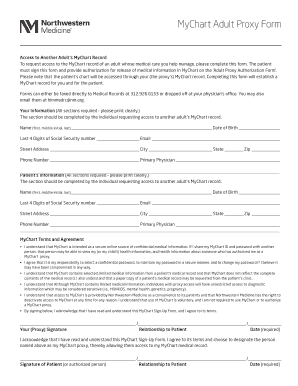
Filling out the MyChart Adult Proxy Form allows you to request access to the MyChart record of an adult for whom you help manage medical care. This guide offers clear, step-by-step instructions to assist you in completing the form accurately and effectively.
Follow the steps to complete the MyChart Adult Proxy Form online
- Press the ‘Get Form’ button to acquire the MyChart Adult Proxy Form. This will allow you to open the document in an editable format.
- Fill out the 'Your Information' section. Ensure all fields are completed clearly. Provide your full name, date of birth, last four digits of your Social Security number, email address, street address, city, state, zip code, phone number, and primary physician's name.
- Next, complete the 'Patient’s Information' section. Similar to step two, fill in the adult's full name, date of birth, last four digits of their Social Security number, email address, street address, city, state, zip code, phone number, and primary physician's name clearly.
- Review the 'MyChart Terms and Agreement' section thoroughly. Acknowledge your understanding of the terms regarding confidentiality, responsibilities for password security, and conditions of access. Signature is required here to confirm your agreement.
- The patient (or authorized person) must then sign the form to designate you as their MyChart proxy. Include their relationship to the patient and date in the designated fields.
- Complete the 'Adult Proxy Authorization for Release of Medical Information' section. Fill in the name of the proxy, their date of birth, and last four digits of their Social Security number. This authorizes the release of the patient's health information.
- Sign for the patient if you are authorized, indicate your authority to do so, and attach any necessary documentation if your signature is not that of the patient.
- Once the form is complete, save any changes before submission. You may print, share, or fax the completed form directly to Medical Records at the provided fax number, or drop it off at the physician’s office.
Complete your MyChart Adult Proxy Form online today to facilitate access to important medical information.
Related links form
You can revoke any proxy access at any time from your MyChart account. Select “Your Menu”, under the “Personalize” section, you will see an option to remove access for any proxies assigned access to your MyChart account.
Industry-leading security and compliance
US Legal Forms protects your data by complying with industry-specific security standards.
-
In businnes since 199725+ years providing professional legal documents.
-
Accredited businessGuarantees that a business meets BBB accreditation standards in the US and Canada.
-
Secured by BraintreeValidated Level 1 PCI DSS compliant payment gateway that accepts most major credit and debit card brands from across the globe.