Loading
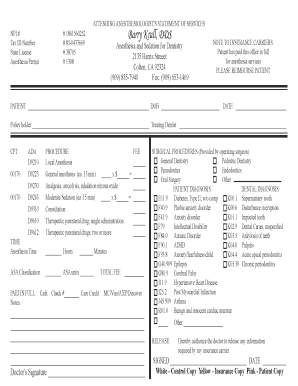
Get Family Practice Management Superbill Template - Aapc
How it works
-

Open form follow the instructions
-

Easily sign the form with your finger
-

Send filled & signed form or save
How to fill out the Family Practice Management Superbill Template - AAPC online
This guide provides step-by-step instructions to assist users in filling out the Family Practice Management Superbill Template - AAPC online. Whether you are new to this process or simply need a refresher, this comprehensive overview will ensure you complete the form accurately and efficiently.
Follow the steps to complete the Family Practice Management Superbill Template online.
- Click ‘Get Form’ button to obtain the template and open it in the editor.
- Begin by entering the attending anesthesiologist's details, including their NPI number, tax ID number, state license, and anesthesia permit number in the designated fields.
- Fill in the practice address and contact information accurately, ensuring that all details are correct.
- In the patient information section, enter the patient's name, date of birth, date of service, and the policyholder's information as needed.
- List the relevant CPT and ADA codes based on the anesthesia and sedation services provided. Include the procedure names and respective fees in the corresponding fields.
- Indicate the total anesthesia time and ASA classification units. Ensure to fill in any relevant notes or payment information.
- In the surgical procedures section, select the applicable specialty areas provided by the operating surgeon.
- Document the patient and dental diagnoses accurately using the corresponding codes listed in the template.
- Obtain the patient’s signature authorizing the release of information to the insurance carrier, and include the date of signature.
- Once all fields are filled out, review the form for accuracy before saving changes. You may now download, print, or share the form as necessary.
Complete your Family Practice Management Superbill Template online today for accurate submissions.
Yes, you can also create your own superbill template. A comprehensive superbill has the following details: Information that will help you identify your client: Name, DOB, address, phone number, and any other information the insurance company may need are all included in this.