We use cookies to improve security, personalize the user experience, enhance our marketing activities (including cooperating with our marketing partners) and for other business use.
Click "here" to read our Cookie Policy. By clicking "Accept" you agree to the use of cookies. Read less
Read more
Accept
Loading
Form preview
  • US Legal Forms
  • Form Library
  • Industry Forms
  • Industry Bank & Financial Forms
  • Icci Bank Transaction Charge Back Form For Disputed Transactions

Get Icci Bank Transaction Charge Back Form For Disputed Transactions

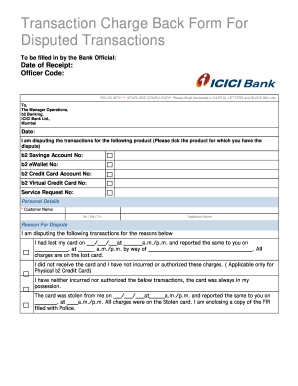
AL LETTERS and BLACK INK only. To, The Manager Operations, b2 Banking, ICICI Bank Ltd., Mumbai Date: I am disputing the transactions for the following product (Please tick the product for which you have the dispute) b2 Savings Account No: b2 eWallet No: b2 Credit Card Account No: b2 Virtual Credit Card No: Service Request No: Personal Details * Customer Name: Mr./ Ms./ Dr. Applicant Name Reason For Dispute I am disputing the following transactions for the reasons below I had lost my card o.

How it works

  1. Open form

    Open form follow the instructions

  2. Easily sign form

    Easily sign the form with your finger

  3. Share form

    Send filled & signed form or save

How to fill out the ICCI Bank Transaction Charge Back Form For Disputed Transactions online

Filing a chargeback can be a crucial step in resolving disputed transactions. This guide provides a comprehensive and user-friendly approach to filling out the ICCI Bank Transaction Charge Back Form for Disputed Transactions online, ensuring that you have all the necessary information at your fingertips.

Follow the steps to complete the form effectively.

  1. Press the ‘Get Form’ button to obtain the form and open it in your chosen editor.
  2. Enter the date of receipt and the officer code in the designated fields, ensuring accuracy as these are essential for processing.
  3. Address the form to 'The Manager Operations, b2 Banking, ICICI Bank Ltd., Mumbai' and provide the current date at the top.
  4. Select the product associated with the disputed transaction by ticking the appropriate box for the following options: b2 Savings Account No, b2 eWallet No, b2 Credit Card Account No, or b2 Virtual Credit Card No.
  5. Fill in the service request number if applicable and provide your personal details, including your name. Remember to use capital letters and black ink only for clarity.
  6. Describe the reason for the dispute by selecting the corresponding statement regarding the card loss, non-receipt, unauthorized transactions, or theft. Be specific about dates and times when reporting incidents.
  7. List the details of the disputed transactions, including the transaction date, merchant name, and transaction amount. Any additional comments can also be added for clarification.
  8. Ensure that you check the document checklist to confirm that you have attached all necessary documents, such as the FIR copy if applicable and additional declarations.
  9. Finally, sign the form to certify that the information provided is accurate and authorize the bank to conduct investigations.
  10. After completing all the sections, you can save changes, download, print, or share the form as required.

Start filling out your documents online today for a smoother process.

Get form

Experience a faster way to fill out and sign forms on the web. Access the most extensive library of templates available.
Get form

Related content

Sample Letter for Disputing Credit and Debit Card...
I am writing to dispute a charge of [$______] to my [credit or debit card] account on...
Learn more
BANKING FRAUD - ITS DETECTION, PREVENTION AND ...
Nov 2, 2021 — ➢ Fraudulent transactions involving foreign exchange. ➢ Any other type...
Learn more
FORM 20-F
Nov 26, 2020 — Yes ☒ No If this report is an annual or transition report, indicate by...
Learn more

Related links form

VA 032-05-068 2001 NSU Health History And Physical Form 2011 WI DNR Form 3400-069 2009 NYU F-1 Student Transfer Release Form

Questions & Answers

Get answers to your most pressing questions about US Legal Forms API.

Contact support

If your issuer accepts the dispute, they'll pass it on to the card network, such as Visa, Mastercard, American Express or Discover, and you may receive a temporary account credit. The card network reviews the transaction and either requires your card issuer to pay or sends the dispute to the merchant's acquiring bank.

To start the dispute process, your bank may ask you to fill out a form with the merchant's name, the transaction date and amount, and the reason for the dispute. Then, your bank will typically go to the merchant's bank to retrieve the money while it investigates, Eaton-Cardone says.

You file a chargeback request. Your card issuer reviews the dispute and will decide if it's valid or if you have to pay. ... The card network reviews the transaction and either requires your card issuer to pay or sends the dispute to the merchant's acquiring bank.

The funds can only be reversed if the beneficiary of the wrong transfer account provides an authorisation letter to the nearest ICICI Bank branch, stating that the funds were erroneously credited to his/ her account and the same can be reversed to the remitter.

To report Internet Banking, Credit, Debit and Prepaid Card transactions not done by you, call Customer Care on 1800 2662.

Oftentimes, you can dispute a charge with your bank or credit card company by filling out a form online and providing some information about the fraudulent charge. You may also have to go into your bank and physically fill out a dispute form. You have 60 days to dispute the charge formally.

You typically need to file a dispute within 60 days of the transaction; however, the specific time frame will highly depend on the type of dispute you're submitting. Regardless of what type of dispute you need to file, we will walk you through everything you need to know about how to dispute a credit card charge.

Visit www.icicibank.com > Go to 'Others' option which is located at bottom of the page > Click on 'Form center' > Select 'Dispute Form' > Click on 'Transaction Dispute form. Click here to visit form center.

A dispute where the cardholder disputes the charge on their card immediately and raises a dispute claim. ... If the merchant does not dispute the claim within 7 days or the information sent is deemed unsatisfactory, the funds withheld from the merchant will be returned to the cardholder.

Visit www.icicibank.com > Go to 'Others' option which is located at bottom of the page > Click on 'Form center' > Select 'Dispute Form' > Click on 'Transaction Dispute form.

Get This Form Now!

Use professional pre-built templates to fill in and sign documents online faster. Get access to thousands of forms.
Get form
If you believe that this page should be taken down, please follow our DMCA take down processhere.

Industry-leading security and compliance

US Legal Forms protects your data by complying with industry-specific security standards.
  • In businnes since 1997
    25+ years providing professional legal documents.
  • Accredited business
    Guarantees that a business meets BBB accreditation standards in the US and Canada.
  • Secured by Braintree
    Validated Level 1 PCI DSS compliant payment gateway that accepts most major credit and debit card brands from across the globe.
Get ICCI Bank Transaction Charge Back Form For Disputed Transactions
Get form
Form Packages
Adoption
Bankruptcy
Contractors
Divorce
Home Sales
Employment
Identity Theft
Incorporation
Landlord Tenant
Living Trust
Name Change
Personal Planning
Small Business
Wills & Estates
Packages A-Z
Form Categories
Affidavits
Bankruptcy
Bill of Sale
Corporate - LLC
Divorce
Employment
Identity Theft
Internet Technology
Landlord Tenant
Living Wills
Name Change
Power of Attorney
Real Estate
Small Estates
Wills
All Forms
Forms A-Z
Form Library
Customer Service
Terms of Service
Privacy Notice
Legal Hub
Content Takedown Policy
Bug Bounty Program
About Us
Help Portal
Legal Resources
Blog
Affiliates
Contact Us
Delete My Account
Site Map
Industries
Forms in Spanish
Localized Forms
State-specific Forms
Forms Kit
Legal Guides
Real Estate Handbook
All Guides
Prepared for You
Notarize
Incorporation services
Our Customers
For Consumers
For Small Business
For Attorneys
Our Sites
US Legal Forms
USLegal
FormsPass
pdfFiller
signNow
airSlate WorkFlow
DocHub
Instapage
Social Media
Call us now toll free:
+1 833 426 79 33
As seen in:
  • USA Today logo picture
  • CBC News logo picture
  • LA Times logo picture
  • The Washington Post logo picture
  • AP logo picture
  • Forbes logo picture
© Copyright 1997-2025
airSlate Legal Forms, Inc.
3720 Flowood Dr, Flowood, Mississippi 39232
Form Packages
Adoption
Bankruptcy
Contractors
Divorce
Home Sales
Employment
Identity Theft
Incorporation
Landlord Tenant
Living Trust
Name Change
Personal Planning
Small Business
Wills & Estates
Packages A-Z
Form Categories
Affidavits
Bankruptcy
Bill of Sale
Corporate - LLC
Divorce
Employment
Identity Theft
Internet Technology
Landlord Tenant
Living Wills
Name Change
Power of Attorney
Real Estate
Small Estates
Wills
All Forms
Forms A-Z
Form Library
Customer Service
Terms of Service
Privacy Notice
Legal Hub
Content Takedown Policy
Bug Bounty Program
About Us
Help Portal
Legal Resources
Blog
Affiliates
Contact Us
Delete My Account
Site Map
Industries
Forms in Spanish
Localized Forms
State-specific Forms
Forms Kit
Legal Guides
Real Estate Handbook
All Guides
Prepared for You
Notarize
Incorporation services
Our Customers
For Consumers
For Small Business
For Attorneys
Our Sites
US Legal Forms
USLegal
FormsPass
pdfFiller
signNow
airSlate WorkFlow
DocHub
Instapage
Social Media
Call us now toll free:
+1 833 426 79 33
As seen in:
  • USA Today logo picture
  • CBC News logo picture
  • LA Times logo picture
  • The Washington Post logo picture
  • AP logo picture
  • Forbes logo picture
© Copyright 1997-2025
airSlate Legal Forms, Inc.
3720 Flowood Dr, Flowood, Mississippi 39232