Loading
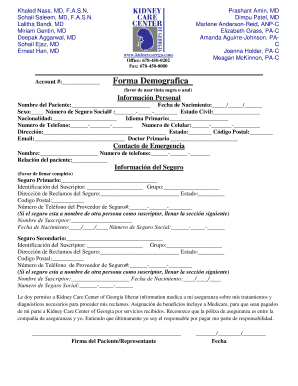
Get Patient Demographic Form En Espanol - Health Ministries
How it works
-

Open form follow the instructions
-

Easily sign the form with your finger
-

Send filled & signed form or save
How to fill out the Patient Demographic Form En Espanol - Health Ministries online
Filling out the Patient Demographic Form En Espanol - Health Ministries is an essential step for ensuring accurate health care provision. This guide will walk you through each section of the form to help you complete it accurately and efficiently.
Follow the steps to complete the form accurately:
- Press the ‘Get Form’ button to obtain the form and open it in the editor.
- In the section labeled 'Información Personal', fill in the 'Nombre del Paciente' with the patient's full name and provide the 'Fecha de Nacimiento' in the format of day/month/year.
- Indicate the 'Sexo' by selecting the appropriate option, and enter the 'Número de Seguro Social' in the designated format.
- Complete the 'Estado Civil' and 'Nacionalidad' fields and choose the 'Idioma Primario' that the patient speaks.
- Enter the 'Numero de Telefono' and 'Numero de Celular' ensuring they are formatted correctly. Then, provide the full 'Dirección', the 'Estado', and 'Código Postal'.
- Add the email address in the 'Email' field and indicate the name of the 'Doctor Primario'.
- For 'Contacto de Emergencia', provide the name and phone number of the emergency contact along with the 'Relación del paciente'.
- In the 'Información del Seguro' section, fill out the details of the primary insurance including 'Seguro Primario', 'Identificación del Suscriptor', 'Grupo', and the 'Dirección de Reclamos del Seguro'.
- Enter the insurance provider's telephone number in the specified field.
- If applicable, fill out the details for a secondary insurance in a similar manner.
- At the bottom of the form, review the permissions paragraph regarding the release of medical information and sign in the 'Firma del Paciente/Representante' section, including the date.
- Once all fields are completed, save the changes made to the document. Options to download, print, or share the form can be used as needed.
Complete your Patient Demographic Form online today for efficient healthcare management.
Demographic information examples include: age, race, ethnicity, gender, marital status, income, education, and employment. You can easily and effectively collect these types of information with survey questions.
Industry-leading security and compliance
US Legal Forms protects your data by complying with industry-specific security standards.
-
In businnes since 199725+ years providing professional legal documents.
-
Accredited businessGuarantees that a business meets BBB accreditation standards in the US and Canada.
-
Secured by BraintreeValidated Level 1 PCI DSS compliant payment gateway that accepts most major credit and debit card brands from across the globe.