Loading
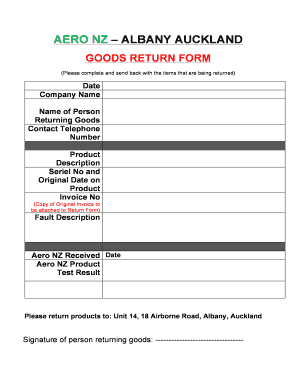
Get Aero Nz Auckland Goods Return Form.docx
How it works
-

Open form follow the instructions
-

Easily sign the form with your finger
-

Send filled & signed form or save
How to fill out the Aero NZ Auckland Goods Return Form.docx online
Filling out the Aero NZ Auckland Goods Return Form online is a straightforward process that ensures a smooth return of items. This guide provides a step-by-step approach, allowing you to complete the form with ease and confidence.
Follow the steps to complete the goods return form
- Click the ‘Get Form’ button to obtain the form and open it in your preferred online editor.
- Enter the current date in the designated Date field to document when the return is initiated.
- Fill in the Company Name of the business returning the goods, ensuring accuracy for proper identification.
- Include the Name of the Person Returning Goods, which could be a representative of the company or the individual dealing with the return.
- Provide the Contact Telephone Number to enable Aero NZ to reach you for any follow-up regarding the return.
- Describe the Product in detail, including specifics that will help in identifying the item being returned.
- Input the Serial No and Original Date on Product to provide a traceable context for the item being returned.
- Include the Invoice No, ensuring you attach a copy of the Original Invoice with the return form for validation.
- Clearly outline the Fault Description, detailing the issues encountered with the product to assist Aero NZ in addressing the problem.
- Leave the Aero NZ Received Date and Aero NZ Product Test Result sections blank; these will be filled out by Aero NZ upon receipt.
- Complete the form by entering your Signature in the provided space to confirm your acknowledgment of the return.
- Once all the required fields are filled, you can save your changes, download the form, print it for your records, or share it as needed.
Complete your Aero NZ Auckland Goods Return Form online today for a hassle-free return process.