Loading
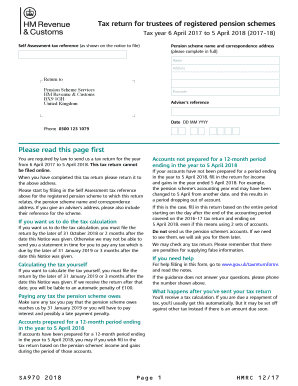
Get Sa970 Tax Return 2018
How it works
-

Open form follow the instructions
-

Easily sign the form with your finger
-

Send filled & signed form or save
How to fill out the Sa970 Tax Return 2018 online
Completing the Sa970 Tax Return for the 2018 tax year can seem daunting, but with this comprehensive guide, you will navigate the process with ease. This guide provides clear, step-by-step instructions on each section of the form to ensure accurate completion.
Follow the steps to accurately complete the Sa970 Tax Return.
- To begin, click the ‘Get Form’ button to obtain the form and open it in your preferred editor.
- Fill in your Self Assessment tax reference at the top of the form, ensuring it corresponds to the registered pension scheme for which you are filing.
- Provide the name of the pension scheme and its correspondence address in the designated fields, making sure all details are accurate.
- Indicate whether tax calculations should be performed by marking the appropriate box. Remember to file before the specified deadlines to avoid penalties.
- Proceed to input your income for the year ended 5 April 2018. Use blue or black ink to fill in amounts, rounding down income and capital gains to the nearest pound.
- Complete the sections regarding income types: UK income, income from overseas investments, trading income, and any income under a Deed of Covenant, filling in necessary details as prompted.
- If applicable, report any other taxable income or chargeable gains under the provided categories, ensuring you follow the prompts carefully.
- Once all sections are completed, review your entries for accuracy. Correct any mistakes or omissions before finalizing.
- Submit the completed tax return to Pension Scheme Services at the address indicated on the form. Do not forget to maintain a copy for your records.
Complete your Sa970 Tax Return online efficiently and accurately to ensure compliance and timely submissions.
number on any letters we have sent to you, it may be on your payslip (look for 'SD Ref Number') or by accessing your Total Reward Statement or Annual Benefit Statement.
Industry-leading security and compliance
US Legal Forms protects your data by complying with industry-specific security standards.
-
In businnes since 199725+ years providing professional legal documents.
-
Accredited businessGuarantees that a business meets BBB accreditation standards in the US and Canada.
-
Secured by BraintreeValidated Level 1 PCI DSS compliant payment gateway that accepts most major credit and debit card brands from across the globe.