Loading
Get Thomasville Pediatrics Patient Portal
How it works
-

Open form follow the instructions
-

Easily sign the form with your finger
-

Send filled & signed form or save
How to fill out the Thomasville Pediatrics Patient Portal online
Filling out the Thomasville Pediatrics Patient Portal registration form is essential for accessing your child's medical information conveniently. This guide will provide clear and detailed instructions to help you complete the form accurately.
Follow the steps to complete your registration seamlessly.
- Click ‘Get Form’ button to access the registration form and open it in your preferred document editor.
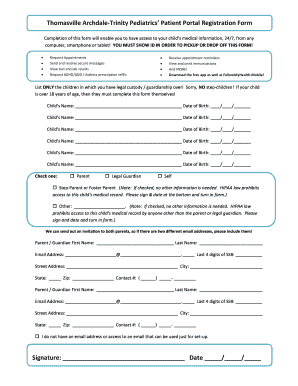
- List the names and dates of birth for all children you have legal custody or guardianship over in the designated fields. Ensure to include only children who meet these criteria.
- Select the appropriate relationship you have with the child by checking one of the options: Parent, Legal Guardian, Self, Step-Parent or Foster Parent, or Other. Note that if you select Step-Parent or Foster Parent, no additional information is required.
- If you are a Parent or Legal Guardian, provide your first and last name, email address, last four digits of your Social Security number, street address, city, state, zip code, and contact number.
- If applicable, complete a second set of fields for the other parent or guardian, following the same instructions as in the previous step, including the email addresses required for sending invitations.
- If you do not have an email address or cannot provide an email for setup, check the provided option indicating so.
- Sign and date the bottom of the form to authenticate your submission.
- Finally, save your completed form, and you may choose to download, print, or share it as needed.
Complete your registration online today and gain full access to your child's health information!