Loading
Get Iras Address
How it works
-

Open form follow the instructions
-

Easily sign the form with your finger
-

Send filled & signed form or save
How to fill out the Iras Address online
Filling out the Iras Address form online can seem daunting, but with this guide, you will navigate the process with confidence. This document will help you understand the various sections and provide detailed instructions on each component of the form, ensuring that you have all the necessary information ready.
Follow the steps to successfully complete the Iras Address form online
- To begin, click the ‘Get Form’ button to obtain the form and open it in your editor.
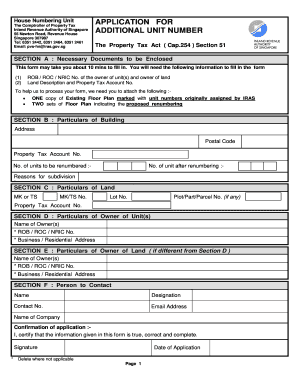
- Review Section A, which outlines the necessary documents. You will need the ROB, ROC, or NRIC number of the owner and the land description along with the Property Tax Account number.
- Prepare the required documents: attach one copy of the existing floor plan marked with the unit numbers assigned by IRAS, along with two sets of the proposed renumbering floor plan.
- In Section B, fill out the particulars of the building, including the address, postal code, property tax account number, the number of units being renumbered, the total number of units after renumbering, and the reasons for subdivision.
- Move on to Section C, providing particulars of the land, including MK or TS, MK/TS number, TS, property tax account number, lot number, and plot/part/parcel number if applicable.
- Complete Section D with the particulars of the owner of the unit(s), including names, ROB, ROC, or NRIC numbers, and the business or residential address.
- If the owner of the land differs from the owner of the unit(s), fill out Section E with their particulars, including names, ROB, ROC, or NRIC numbers, and the business or residential address.
- In Section F, provide the contact person's name, designation, contact number, email address, and the name of the company.
- Acknowledge your application in the confirmation section by certifying that the information provided is true, correct, and complete. Remember to sign and date your application.
- Complete Section G by filling in your name as the applicant and your address.
- Lastly, fill out Section H with details regarding the renumbering process, attaching a separate sheet if more space is required. Input all pertinent property tax account numbers and existing floor areas.
- Once all sections are completed, you can save changes, download, print, or share the completed form as necessary.
Start filling out your documents online today for a smooth submission process!
Call our friendly team on +65 6812 1611 or request a call back using the form below.