Loading
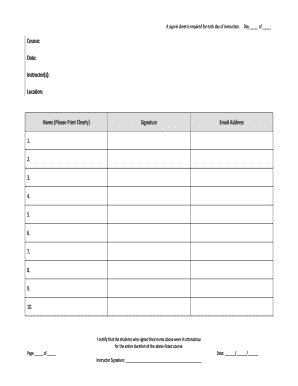
Get Student Sign-in Sheet.docx
How it works
-

Open form follow the instructions
-

Easily sign the form with your finger
-

Send filled & signed form or save
How to fill out the Student Sign-In Sheet.docx online
Filling out the Student Sign-In Sheet.docx is an essential task for documenting attendance in any instructional setting. This guide provides step-by-step instructions to help you complete the form accurately and efficiently online.
Follow the steps to complete your Student Sign-In Sheet successfully.
- Click the ‘Get Form’ button to access the Student Sign-In Sheet and open it in your preferred digital editor.
- Locate the section labeled 'Course' and enter the name of the course being taught.
- In the 'Date' field, input the current date of the instruction.
- Fill in the 'Instructor(s)' section with the names of the instructors leading the course.
- Complete the 'Location' field by specifying where the instruction is taking place.
- In the 'Name (Please Print Clearly)' section, each participating individual should print their name clearly.
- Each individual must provide their signature in the designated 'Signature' column next to their printed name.
- Next, users should provide their 'Email Address' in the corresponding field, ensuring it is accurate for communication purposes.
- Repeat the name, signature, and email address steps for each participant, filling in all available fields up to the maximum number of entries allowed.
- At the end of the form, the instructor needs to certify attendance by signing their name in the 'Instructor Signature' section.
- Complete the date in the certification section to indicate when the form was signed.
- Lastly, once all fields are completed, you can save the changes, download, print, or share the Student Sign-In Sheet as needed.
Complete your documents online today for a seamless educational experience.
What should be included in a sign-up sheet? As we mentioned earlier, a sign-up sheet's purpose is to collect vital information for each individual who will attend your event. So, whatever information that you require should be included on the sheet. The basics are Name, Contact Information, Date, and Time.