Loading
Get Primerica Policy Owner Services
How it works
-

Open form follow the instructions
-

Easily sign the form with your finger
-

Send filled & signed form or save
How to fill out the Primerica Policy Owner Services online
Filling out the Primerica Policy Owner Services form online can streamline the process of managing your insurance policy. This guide offers clear steps to ensure you complete the form accurately and easily.
Follow the steps to complete your form successfully.
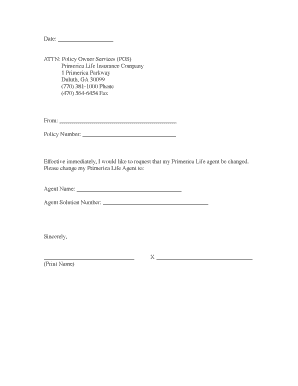
- To start, click the ‘Get Form’ button to access the document and open it in your browser or designated application.
- In the designated area labeled 'Date,' enter the current date when you are filling out the form.
- Find the section that begins with 'From.' In this field, provide your full name as the policyholder.
- Next, locate the 'Policy Number' field. Input your specific policy number linked to your Primerica insurance.
- Within the request section, indicate your desire to change your Primerica Life agent. Make sure to phrase it clearly for better understanding.
- In the fields for 'Agent Name,' enter the name of the new agent you wish to assign to your policy.
- Next, fill in the 'Agent Solution Number' associated with the new agent to ensure accurate processing.
- Before concluding, sign your name in the section labeled 'Sincerely' to validate your request.
- Finally, save your changes and consider downloading, printing, or sharing the completed form as necessary for your records.
Complete your Primerica Policy Owner Services form online today for efficient policy management.
Primerica IS a legitimate company. In fact, they are a publicly-traded company on the stock market, and have operated for decades, helping people with their life insurance needs.