Loading
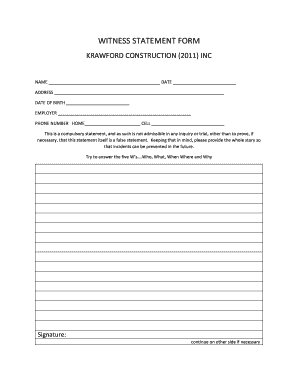
Get Witness Statement Form - Krawford Construction
How it works
-

Open form follow the instructions
-

Easily sign the form with your finger
-

Send filled & signed form or save
How to fill out the Witness Statement Form - Krawford Construction online
The Witness Statement Form - Krawford Construction is essential for documenting your account of an incident. This guide provides clear, step-by-step instructions to help you complete the form online effectively.
Follow the steps to fill out the Witness Statement Form online.
- Click ‘Get Form’ button to obtain the form and open it in the editor.
- Begin by entering your full name in the designated field. Ensure that this is the name you are known by, as it will be used for any follow-up communications regarding the statement.
- Next, fill in the date on which you are completing the form. This provides a timeline for the statement.
- In the address section, provide your complete residential address. This information assists in establishing your identity and whereabouts.
- Enter your date of birth in the appropriate field. This information may be necessary for identification purposes.
- List your current employer in the employer field. If you are not employed, you may leave this section blank or specify your status.
- You must provide a home phone number and a cell phone number. Ensure these are accurate so that you can be contacted if necessary.
- In the section provided for your account of the incident, address the five W’s: Who, What, When, Where, and Why. Be as detailed and clear as possible to provide a comprehensive statement.
- If your statement requires additional space, continue writing on the other side of the form as indicated.
- Finally, review all entries for accuracy, then proceed to save any changes. You may also download, print, or share your completed form as needed.
Start filling out your Witness Statement Form online today to ensure accurate reporting of your account.