Loading
Get Domiciliary Treatment Claim Form - Paramount Health Services
How it works
-

Open form follow the instructions
-

Easily sign the form with your finger
-

Send filled & signed form or save
How to fill out the Domiciliary Treatment Claim Form - Paramount Health Services online
Filling out the Domiciliary Treatment Claim Form is an essential step in seeking reimbursement for your medical expenses. This guide provides a clear, step-by-step approach to ensure you complete the form accurately and efficiently online.
Follow the steps to complete your claim form with ease.
- Click ‘Get Form’ button to obtain the form and open it in the editor.
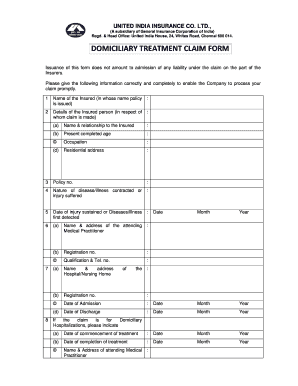
- Provide your name in the section labeled 'Name of the Insured.' This should be the individual in whose name the policy is issued.
- Enter the details of the insured person for whom the claim is made, including their name, relationship to the insured, present age, occupation, and residential address.
- Fill in your policy number in the designated field to identify your insurance plan.
- Describe the nature of the disease or illness contracted or specify the injury suffered in the respective field.
- Indicate the date when the injury was sustained or when the disease/illness was first detected.
- Provide details about the attending medical practitioner, including their name, address, registration number, qualification, and telephone number.
- If applicable, give the name and address of the hospital or nursing home, along with their registration number. Include the date of admission and discharge.
- For domiciliary hospitalizations, specify the date treatment commenced and completed. Also, provide the name and address of the attending medical practitioner, their telephone number, and registration number.
- In the section for expenses, list the treatment costs incurred along with the corresponding receipt numbers, dates, nature of the expenditure, amounts claimed, and amounts payable.
- Ensure you agree to the declarations stated in the form regarding the truthfulness of the information provided and absence of other benefits for the same treatment.
- Provide your signature, date the form, and include the details for electronic transfer, such as the account holder's name, bank name, account number, IFSC code, and bank address.
- Finally, remember to attach a copy of the canceled cheque leaf to ensure the accuracy of the account details provided. Save your changes, download, print, or share the form as needed.
Start filling out your Domiciliary Treatment Claim Form online today to ensure prompt processing of your claim.
Payer Name: Paramount Health Care|Payer ID: PARHC|Professional (CMS1500)/Institutional (UB04)[Hospitals]