Loading
Get Inspections - Self-certification Form - San Antonio Housing...
How it works
-

Open form follow the instructions
-

Easily sign the form with your finger
-

Send filled & signed form or save
How to fill out the Inspections - Self-Certification Form - San Antonio Housing online
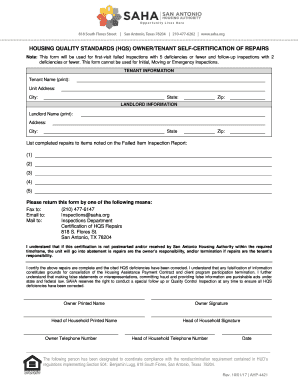
Filling out the Inspections - Self-Certification Form is an important process for ensuring that any deficiencies noted during inspections are addressed properly. This guide will assist you in completing the form accurately and efficiently to facilitate compliance with housing standards in San Antonio.
Follow the steps to successfully complete the form online.
- Click the ‘Get Form’ button to access the Inspections - Self-Certification Form and open it in your preferred online editor.
- Begin filling out the tenant information section. Provide the tenant’s full name, the unit address, city, state, and zip code.
- Next, move to the landlord information section. Input the landlord’s name, address, city, state, and zip code accurately.
- In the repairs section, list the completed repairs corresponding to the deficiencies noted in the Failed Item Inspection Report. Enter each item one by one, ensuring clarity and completeness for all repairs made.
- After completing all necessary fields, review the entire form thoroughly to ensure all information provided is correct and complete.
- Finally, you can save any changes made, download, print, or share the completed form using the appropriate functions in your online editor.
Complete your Inspections - Self-Certification Form online today to ensure compliance and maintain housing standards.
Get form
Experience a faster way to fill out and sign forms on the web. Access the most extensive library of templates available.
Get This Form Now!
Use professional pre-built templates to fill in and sign documents online faster. Get access to thousands of forms.