Loading
Get Yabc Y-2 2008-2026
How it works
-

Open form follow the instructions
-

Easily sign the form with your finger
-

Send filled & signed form or save
How to fill out the YABC Y-2 online
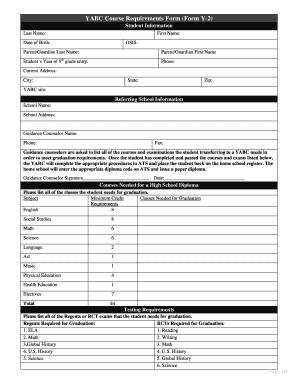
Filling out the YABC Y-2 form is an essential process for students transferring to the YABC program. This guide provides a comprehensive overview of the document's components, along with step-by-step instructions to help users complete the form efficiently.
Follow the steps to accurately complete the YABC Y-2 form.
- Click the 'Get Form' button to access the YABC Y-2 form and open it in your preferred editor.
- In the 'Student Information' section, enter the student's last name, first name, date of birth, and OSIS number. Make sure to provide accurate information.
- Input the parent or guardian's last and first names, the student's year of 9th grade entry, and a contact phone number.
- Fill in the current address details including the city, state, and zip code.
- Indicate the YABC site where the student will be attending.
- Move to the 'Referring School Information' section. Write the name and address of the referring school.
- Provide the guidance counselor's name and their contact phone number, along with the fax number.
- Guidance counselors need to list all the courses and examinations the student requires to meet graduation requirements.
- In the 'Courses Needed for a High School Diploma' section, list each subject and the minimum credit requirements as outlined in the form.
- After listing the necessary subjects, complete the 'Testing Requirements' section by noting all Regents or RCT exams required for graduation.
- Ensure that the guidance counselor signs and dates the form where indicated.
- Once the form is completed, save your changes, then download, print, or share the completed document as needed.
Complete your YABC Y-2 form online today for a smooth transition to the YABC program.
If your high school diploma is destroyed, you can still obtain a replacement by contacting your school’s records office. They will guide you through the process of verifying your graduation status. Engaging with resources such as US Legal Forms can also simplify this task.