Loading
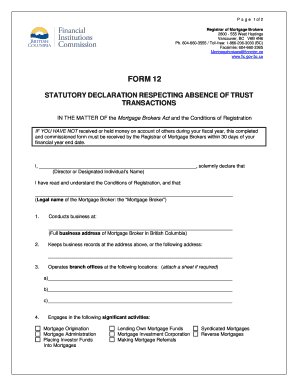
Get Form 12
How it works
-

Open form follow the instructions
-

Easily sign the form with your finger
-

Send filled & signed form or save
How to fill out the Form 12 online
Filling out the Form 12, a statutory declaration respecting the absence of trust transactions, is essential for mortgage brokers who have not handled trust funds during their fiscal year. This guide will help you navigate each section of the form, ensuring the completion process is straightforward and accessible.
Follow the steps to fill out the Form 12 accurately.
- Press the ‘Get Form’ button to access the form. This will open the document in your editor, allowing you to begin filling it out.
- In the first section, enter the name of the director or designated individual in the provided space. This person should be responsible for the contents of the declaration.
- Next, complete the field for the legal name of the mortgage broker. Ensure that you provide the full name as registered.
- Provide the full business address of the mortgage broker in British Columbia in the designated area. This should reflect the official business location.
- The next section requires you to indicate where business records are kept. You may repeat the business address or provide an alternate address if necessary.
- List the branch offices operated by your mortgage brokerage. You may attach a separate sheet if there are more than three locations.
- Identify the significant activities engaged in by your mortgage brokerage, selecting from the various options listed.
- In the following section, mark the date that corresponds to the end of your financial year in the format specified (month/day/year).
- Confirm that you did not handle any trust funds during the specified year by checking off the appropriate boxes for various fund types listed.
- Conclude by signing the declaration in the presence of a commissioner for taking affidavits in British Columbia. Ensure the date of declaration is filled in correctly.
- After completing the form, you can save your changes, download it for your records, print a copy, or share it as required.
Prepare and submit your Form 12 online today to ensure compliance with mortgage broker regulations.
Answer: To access your online PTIN account, go to the PTIN system login page. Then click “Log In”. Enter your User ID and Password in the designated fields, click “Log In”.
Industry-leading security and compliance
US Legal Forms protects your data by complying with industry-specific security standards.
-
In businnes since 199725+ years providing professional legal documents.
-
Accredited businessGuarantees that a business meets BBB accreditation standards in the US and Canada.
-
Secured by BraintreeValidated Level 1 PCI DSS compliant payment gateway that accepts most major credit and debit card brands from across the globe.