Loading
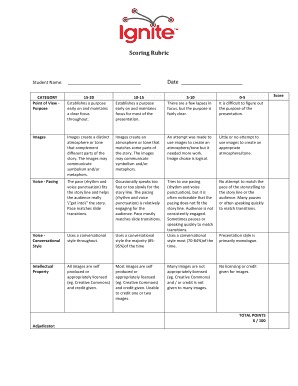
Get Ignite Scoring Rubric - Wikis
How it works
-

Open form follow the instructions
-

Easily sign the form with your finger
-

Send filled & signed form or save
How to use or fill out the Ignite Scoring Rubric - Wikis online
This guide provides a clear and supportive framework for effectively filling out the Ignite Scoring Rubric - Wikis online. Follow the detailed steps to ensure you accurately complete each section of the form and assess presentations competently.
Follow the steps to effectively fill out the Ignite Scoring Rubric - Wikis.
- Click ‘Get Form’ button to access the form and open it in your editing tool.
- Start by entering the student's name in the designated field labeled 'Student Name.' Make sure to spell the name correctly.
- Next, input the date in the 'Date' field. This provides a chronological reference for the evaluation.
- Proceed to the 'CATEGORY' section. Here, you will assess various elements such as 'Point of View - Purpose.' Read the criteria carefully and select the appropriate score that reflects the presentation's effectiveness based on the rubric descriptions.
- Continue evaluating additional categories like 'Images' and 'Voice - Pacing.' For each category, follow the given scoring scale to determine how well the presentation meets the expected standards.
- Complete the 'Intellectual Property' section by evaluating the use and attribution of images according to licensing guidelines provided in the rubric.
- After reviewing each category, total the points achieved and enter the score in the 'TOTAL POINTS' field. Ensure accuracy in your calculations to reflect the presentation's overall assessment.
- Finally, you can save changes, download, print, or share the completed rubric as needed to utilize in presentations or feedback.
Start filling out the Ignite Scoring Rubric - Wikis online now to provide precise evaluations!
Industry-leading security and compliance
US Legal Forms protects your data by complying with industry-specific security standards.
-
In businnes since 199725+ years providing professional legal documents.
-
Accredited businessGuarantees that a business meets BBB accreditation standards in the US and Canada.
-
Secured by BraintreeValidated Level 1 PCI DSS compliant payment gateway that accepts most major credit and debit card brands from across the globe.