Loading
Get Cng Form 690-58 Fehb Vs Trs
How it works
-

Open form follow the instructions
-

Easily sign the form with your finger
-

Send filled & signed form or save
How to fill out the CNG Form 690-58 FEHB Vs TRS online
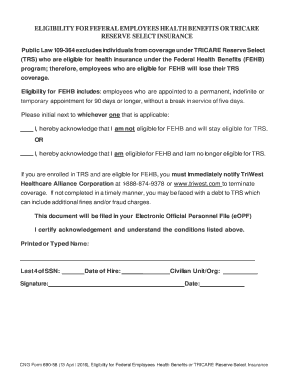
Filling out the CNG Form 690-58, which pertains to the eligibility for Federal Employees Health Benefits or TRICARE Reserve Select Insurance, can seem daunting. However, this guide will provide you with clear, step-by-step instructions to navigate the online filling process effectively.
Follow the steps to complete the form accurately and efficiently.
- Click ‘Get Form’ button to acquire the form and open it in the provided editor.
- Begin by reviewing the eligibility criteria for FEHB and TRS. Ensure that your employment status aligns with the definitions provided in the document.
- In the section regarding TRS eligibility, you must acknowledge your status by initialing one of the statements. Choose whether you are opting for FEHB or continuing with TRS coverage. This is critical as it impacts your health insurance benefits.
- If you are eligible for FEHB and enrolled in TRS, it’s essential to note the requirement to notify TriWest Healthcare Alliance Corporation. This can be done by calling the designated number or visiting their website to terminate your TRS coverage appropriately.
- Proceed to fill in your personal information, including your printed or typed name, the last four digits of your Social Security Number, and the date of hire.
- Complete the form by providing your civilian unit or organization information and the date of filling out the form.
- Once all sections are filled correctly, review the information for accuracy, then save your changes. You can choose to download, print, or share the completed form as needed.
Take the next step and complete your documents online to ensure your eligibility is accurately recorded.