Loading
Get Reitman Personnel
How it works
-

Open form follow the instructions
-

Easily sign the form with your finger
-

Send filled & signed form or save
How to fill out the Reitman Personnel online
Filling out the Reitman Personnel form is a crucial step to ensuring accurate record-keeping and timely compensation. This guide provides a step-by-step approach, allowing users to navigate the process smoothly and efficiently.
Follow the steps to complete the Reitman Personnel form online easily.
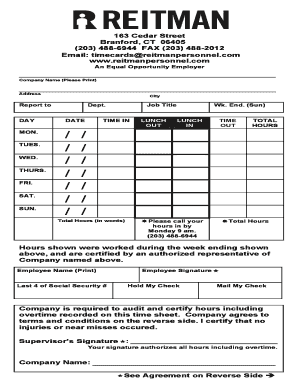
- Press the ‘Get Form’ button to obtain the Reitman Personnel form and open it in your preferred editor.
- Fill in the ‘Company Name’ and ‘Address’ fields with the appropriate information.
- Enter the ‘City’, ‘Report To’, and ‘Department’ details in their respective fields.
- In the ‘DAY’ section, record the relevant days, followed by the respective date for each day starting from Monday to Sunday.
- Indicate your ‘Job Title’ in the designated field.
- Log your ‘TIME IN’ and ‘LUNCH OUT’ times for each working day.
- Document your ‘LUNCH IN’ and ‘TIME OUT’ hours for each day.
- Calculate and enter the ‘TOTAL HOURS’ worked for the week.
- Write out the ‘Total Hours’ in words for clarity.
- Submit your hours by calling, faxing, or emailing your completed time sheet by Monday at 9 am.
- Once completed, save your changes, download, print, or share the filled form as needed.
Complete your Reitman Personnel form online to ensure accurate processing and timely payment.