Loading
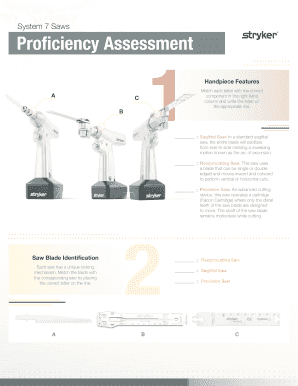
Get System 7 Saws - Stryker Learn
How it works
-

Open form follow the instructions
-

Easily sign the form with your finger
-

Send filled & signed form or save
How to fill out the System 7 Saws - Stryker LEARN online
Filling out the System 7 Saws - Stryker LEARN form online is essential for users to effectively demonstrate their knowledge and proficiency with the equipment. This guide provides detailed steps to navigate the form with clarity and ease.
Follow the steps to complete the System 7 Saws - Stryker LEARN form online.
- Click the ‘Get Form’ button to access the document and open it in your preferred editor.
- Begin by reviewing the handpiece features section. Identify the different types of saws and write the correct corresponding letters in the spaces provided.
- Proceed to the saw blade identification part. Match each saw with its unique locking mechanism by placing the appropriate letters in the designated locations.
- Move to the troubleshooting quiz section. Carefully read each question and select the correct answer options. Ensure to mark these accurately to reflect your understanding.
- Complete the section labeled 'Completed By' by filling in your name, the date, and, if required, the name and signature of your supervisor or trainer.
- Once all sections are filled out, review the document for accuracy. Finally, save changes, download a copy, print it, or share the completed form as necessary.
Start filling out the System 7 Saws - Stryker LEARN form online today!
15-Mar-2017. Stryker's Instruments division announces the launch of System 8 power tools, an evolutionary system that delivers increased reliability in the O.R. and throughout the hospital, and brings additional tools for dedicated orthopaedic applications within one family.