Loading
Get Osdi
How it works
-

Open form follow the instructions
-

Easily sign the form with your finger
-

Send filled & signed form or save
How to fill out the OSDI online
The Ocular Surface Disease Index (OSDI) is a valuable tool designed to assess the impact of dry eye disease on a person's quality of life. This guide provides clear, step-by-step instructions to help you effectively fill out the OSDI online.
Follow the steps to complete the OSDI form online.
- Click ‘Get Form’ button to obtain the OSDI and open it in the editor.
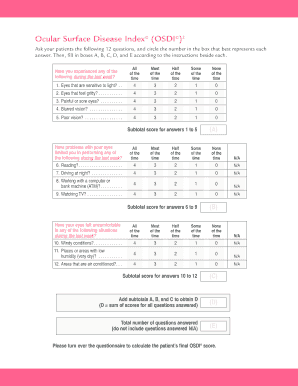
- Begin with the first section that includes 12 questions about symptoms. For each question, circle the number that best represents your experiences regarding dry eyes, ranging from 'All of the time' to 'None of the time'.
- After answering the first five questions, calculate the subtotal score for questions 1 to 5 and enter it in box A.
- Proceed to answer questions 6 through 9, which assess how your symptoms have impacted specific activities during the last week. Again, calculate the subtotal score for these questions and enter it in box B.
- Fill out questions 10 to 12, which inquire about comfort in particular conditions. Calculate this subtotal score and place it in box C.
- To obtain the total score, add the subtotals from boxes A, B, and C, and enter the result in box D.
- Count the total number of questions you answered and write this number in box E, excluding any questions marked as N/A.
- Continue to the second side of the form where you will use the scores from boxes D and E to determine the severity of your dry eye disease using the provided chart.
- Finally, make sure to save your changes and consider downloading, printing, or sharing the form as needed.
Complete your OSDI form online today for a better understanding of your dry eye condition.
Operating Systems Design and Implementation (OSDI) is one of the top academic conferences in the field of computer systems.