Loading
Get Colegio De Sta. Rosa Paascu Accredited Level Ii ...
How it works
-

Open form follow the instructions
-

Easily sign the form with your finger
-

Send filled & signed form or save
How to fill out the COLEGIO DE STA. ROSA PAASCU ACCREDITED LEVEL II application online
Filling out the COLEGIO DE STA. ROSA PAASCU ACCREDITED LEVEL II application form is a vital step in the admission process. This guide aims to provide clear, step-by-step instructions to ensure that you accurately complete each section of the form online.
Follow the steps to successfully complete your application.
- Click ‘Get Form’ button to obtain the application form and open it in your preferred document editor.
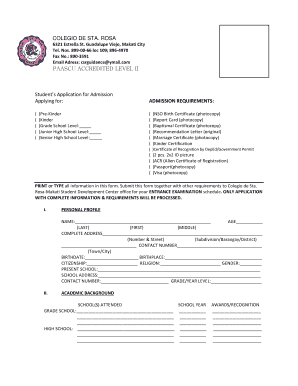
- Start with the 'Applying for' section. Indicate the grade level to which you are applying by checking the appropriate box (Pre-Kinder, Kinder, Grade School, Junior High School, or Senior High School).
- In the 'Admission Requirements' section, ensure you have all necessary documents ready for submission. These may include copies of your birth certificate, report card, baptismal certificate, recommendation letter, marriage certificate, kinder certification, and any additional required documents.
- Next, fill in the 'Personal Profile' section. Complete all fields with accurate information, including your full name, age, complete address, contact number, birthdate, birthplace, citizenship, religion, present school, school address, and contact number. Ensure that you print or type all information clearly.
- Move on to the 'Academic Background' section. List all schools you have attended along with the corresponding school years and grade levels. If applicable, add any awards or recognition received.
- In the 'Family Background' section, provide information for both parents, including their names, occupations, employer addresses, and contact numbers. If there is a guardian, include their details as well.
- Answer the question regarding previous applications to the Colegio de Sta. Rosa-Makati and indicate if any family members have attended the school, filling in the necessary details.
- Certify that all information provided is complete and accurate by having the appropriate signatures where indicated: father, mother, and designated guardian.
- Finally, review your application thoroughly for any errors or omissions. Once confirmed, you can save changes, download, print, or share the application form as needed.
Ensure a smooth application process by completing your form online today.
Considered the most prestigious and widely-recognized type of accreditation, regionally-accredited schools are reviewed by their designated regional agency. Nationally-accredited agencies review institutions of a similar type, such as career, vocational, and technical (art & design, nursing, etc.)
Industry-leading security and compliance
US Legal Forms protects your data by complying with industry-specific security standards.
-
In businnes since 199725+ years providing professional legal documents.
-
Accredited businessGuarantees that a business meets BBB accreditation standards in the US and Canada.
-
Secured by BraintreeValidated Level 1 PCI DSS compliant payment gateway that accepts most major credit and debit card brands from across the globe.