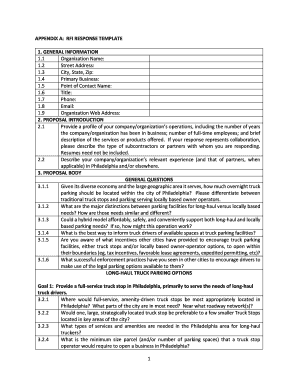
APPENDIX A: RFI RESPONSE TEMPLATE 1. GENERAL INFORMATION 1.1 Organization Name: 1.2 Street Address: 1.3 City, State, Zip: 1.4 Primary Business: 1.5 Point of Contact Name: 1.6 Title: 1.7 Phone: 1.8 Email: 1.9 Organization.
Loading
Open form follow the instructions
Easily sign the form with your finger
Send filled & signed form or save
How to fill out the Rfi Response Template online
Filling out the Rfi Response Template online is a straightforward process that allows organizations to provide essential information regarding their operations and proposals. This guide offers step-by-step instructions on how to complete each section of the template effectively.
Follow the steps to complete the Rfi Response Template.
- Click the ‘Get Form’ button to access the Rfi Response Template and open it in your preferred online editor.
- Begin with the General Information section. Fill in the fields with your organization's name, street address, city, state, zip code, primary business, point of contact name, title, phone number, email, and organization web address as needed.
- In the Proposal Introduction section, provide a profile of your organization's operations, including years in business, number of full-time employees, and a brief description of services or products. If applicable, detail any collaboration with subcontractors or partners.
- Describe your organization's relevant experience in Philadelphia or other locations in the Proposal Introduction section by summarizing past projects or services related to the inquiry.
- Move to the Proposal Body section, starting with General Questions. Answer questions about overnight truck parking needs, distinctions between long-haul and local parking facilities, and potential hybrid models. Ensure to provide detailed and thoughtful responses.
- Continue through the Proposal Body to address Long-Haul Truck Parking Options. Provide insights into the ideal locations for full-service truck stops, necessary services and amenities, and any land ownership preferences.
- Complete the Local-Serving Tractor Trailer Truck Parking Options section by outlining necessary site needs, operation hours, and discussing potential agreements with local businesses for parking arrangements.
- Finally, use the Other section to add any additional information or recommendations not covered in previous questions, offering further insights about truck parking options.
- Once all sections are completed, remember to save your changes, and choose to download, print, or share the filled-out template as required.
Start completing your Rfi Response Template online today and ensure your submission is thorough and insightful.
Experience a faster way to fill out and sign forms on the web. Access the most extensive library of templates available.
Related content
RFP, but rather to provide examples of language common to LMR subscriber units RFIs and...
The supplier questions should be sent in Excel format to the suppliers so, they can submit...
A request for proposal (RFP) is a document that solicits proposal, often made through a...
Get answers to your most pressing questions about US Legal Forms API.
How to write an RFI construction example?
How to Write a Construction RFI Project name and address. RFI number (in sequential order for the project) RFI title (and a brief description) Date you submitted the RFI and a deadline for the response. Name, title, company, and contact information for the requesting party.
How to write an RFI example?
RFI example Company name: (your company name) Company address: (your company address) Project name: Branding design. Contact information: (your company email address and phone number) Date issued: (when you sent out the RFI) Date due: (when you expect to receive a response)
How do you draft and RFI response?
How to Write an RFI Draft an overview or statement of need. Outline your goals and objectives, along with some general information about your company. ... Add context about your organization. ... Finalize the details. ... Mention information about the process.
How do you respond to an RFI?
Reply to the RFI by Email Open the New RFI message in your email client. A message resembling the one below appears. Click Reply in your email client. The system reveals a reply form and the reply to email address. In the body of the email message, enter the message for your reply. Notes: ... Click Send.
What are the steps in an RFI process?
The RFI process Creation. Define your need and create a problem statement. Provide background about your company. Write RFI questions to gather information. Administration. Select vendors to include and send the RFI. Answer any follow up questions. Gather vendor responses. Evaluation.
What is formal RFI response?
The RFI response is the response the vendor will give back to an organization after the initial RFI. More than likely, a vendor will be using a response management platform to respond to RFIs.
How do I write an email to RFI?
How to write a request for information Basic request details. The top section of the RFI may include basic details about the request. ... Statement of purpose. You can begin the body section by including a one-paragraph overview of the information you seek from the company. ... Project summary. ... Company background. ... Response section.
How do you write an RFI response?
Top Tips Design your RFI for ease of completion and comparison. Provide a clear overview of your needs / challenges. Supply background information and supporting materials. Don't get too specific (the RFP and RFQ serve that purpose) Keep it brief to respect your vendors' time.
Use professional pre-built templates to fill in and sign documents online faster. Get access to thousands of forms.
If you believe that this page should be taken down, please follow our DMCA take down process here.