Loading
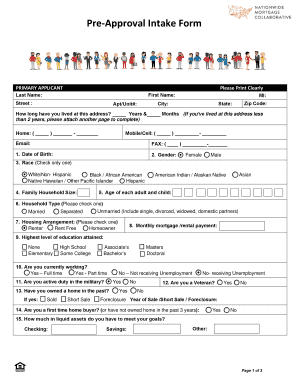
Get Pre-approval Intake Form - Nationwide Mortgage Collaborative
How it works
-

Open form follow the instructions
-

Easily sign the form with your finger
-

Send filled & signed form or save
How to fill out the Pre-Approval Intake Form - Nationwide Mortgage Collaborative online
Completing the Pre-Approval Intake Form is a crucial step in obtaining your mortgage. This guide will provide you with clear instructions on how to accurately fill out the form online, ensuring you provide all necessary information for a smooth pre-approval process.
Follow the steps to successfully complete the intake form online.
- Press the ‘Get Form’ button to access the Pre-Approval Intake Form. Ensure the form opens correctly in your editing interface.
- In the 'Primary Applicant' section, fill in your last name, first name, middle initial, street address, unit number (if applicable), city, state, and zip code. Provide the duration of your residence at this address in years and months. If you have resided there for less than two years, attach an additional page with your previous addresses.
- Fill in your home and mobile numbers, email address, and fax number if applicable. Next, provide your date of birth.
- Indicate your gender by checking the appropriate box. Then select your race from the provided options, ensuring to check only one.
- Specify your family household size and list the ages of each adult and child in your household. This information is essential for determining mortgage eligibility.
- Determine your household type by selecting one of the options: married, separated, or unmarried. This includes various definitions of relationship status.
- Choose your housing arrangement by checking whether you are a renter, rent-free, or homeowner.
- Provide your monthly mortgage or rental payment to facilitate your financial assessment.
- Indicate your highest level of education attained by checking the corresponding box.
- Answer whether you are currently employed full-time, part-time, or if you are not receiving unemployment. Make sure to provide clarity on your current employment status.
- State if you are active duty in the military or if you are a veteran by selecting the appropriate option.
- Indicate whether you have owned a home in the past and provide details if applicable, including the year of sale or foreclosure.
- Finally, outline your liquid assets by filling in amounts for checking, savings, and any other liquid assets you possess.
- Complete the 'Primary Applicant Employment' section by providing employment details for the last two years, including employer information, hire date, job title, and annual gross income.
- If applicable, repeat the employment details for the co-applicant section, ensuring all fields are filled out accurately.
- Complete the 'Real-Estate Agent Information' section if you are working with an agent.
- Review all entries for accuracy and completeness. Once you are satisfied with the information entered, you can save changes, download, print, or share the form as necessary.
Complete your Pre-Approval Intake Form online today to take the next step towards homeownership.
Industry-leading security and compliance
US Legal Forms protects your data by complying with industry-specific security standards.
-
In businnes since 199725+ years providing professional legal documents.
-
Accredited businessGuarantees that a business meets BBB accreditation standards in the US and Canada.
-
Secured by BraintreeValidated Level 1 PCI DSS compliant payment gateway that accepts most major credit and debit card brands from across the globe.