Loading
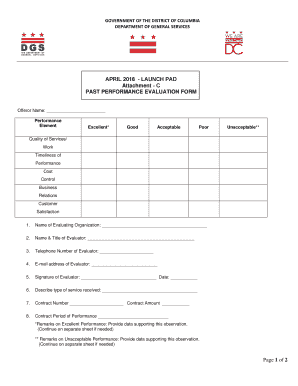
Get Attachment C - Past Performance Evaluation Form.pdf
How it works
-

Open form follow the instructions
-

Easily sign the form with your finger
-

Send filled & signed form or save
How to fill out the Attachment C - Past Performance Evaluation Form.pdf online
Filling out the Attachment C - Past Performance Evaluation Form.pdf online is essential for providing a thorough evaluation of contractor performance. This guide will assist you in navigating each section of the form smoothly and effectively.
Follow the steps to successfully complete the evaluation form.
- Click ‘Get Form’ button to access the form and view it in the designated online interface.
- Begin by filling in the ‘Offeror Name’ field with the name of the organization being evaluated. Ensure that it is spelled correctly and matches the official name.
- Evaluate the performance elements such as Quality of Services/Work, Timeliness of Performance, Cost Control, Business Relations, and Customer Satisfaction. For each element, select the appropriate rating that reflects the overall performance — Excellent, Good, Acceptable, Poor, or Unacceptable.
- In the next section, enter the ‘Name of Evaluating Organization’ as well as the ‘Name & Title of Evaluator’. This identifies the person completing the evaluation.
- Provide contact information by filling in the ‘Telephone Number of Evaluator’ and ‘E-mail address of Evaluator’. This is crucial for any follow-up communication related to the evaluation.
- Sign the form by including the ‘Signature of Evaluator’ and the date in the designated fields. This formalizes the completion of the evaluation.
- Detail the type of service received by describing it in the blank field provided. Be as specific as possible to give context to the evaluation.
- Fill in the ‘Contract Number’ and ‘Contract Amount’, ensuring these details are accurate and correspond to the relevant contract.
- Specify the ‘Contract Period of Performance’ by indicating the start and end dates of the evaluated contract.
- If you have additional remarks on performance, particularly for categories rated as Excellent or Unacceptable, include this information in the designated areas or on separate sheets as necessary.
- Once all fields have been completed accurately, you have the option to save changes, download, print, or share the form as required.
Complete your evaluation form online today to ensure accurate performance assessments.
Industry-leading security and compliance
US Legal Forms protects your data by complying with industry-specific security standards.
-
In businnes since 199725+ years providing professional legal documents.
-
Accredited businessGuarantees that a business meets BBB accreditation standards in the US and Canada.
-
Secured by BraintreeValidated Level 1 PCI DSS compliant payment gateway that accepts most major credit and debit card brands from across the globe.