Loading
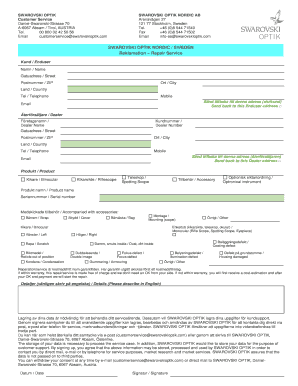
Get Repair Form - Swarovski Optik
How it works
-

Open form follow the instructions
-

Easily sign the form with your finger
-

Send filled & signed form or save
How to fill out the Repair Form - Swarovski Optik online
This guide provides step-by-step instructions on how to efficiently complete the Repair Form for Swarovski Optik online. Whether you have prior experience or are new to filling out online forms, this comprehensive guide will help you navigate through every necessary section.
Follow the steps to complete the Repair Form.
- Press the ‘Get Form’ button to access the Repair Form and open it in your preferred online editor.
- Begin with the 'Customer Information' section. Input your name, address, ZIP code, city, country, telephone number, and mobile number. Ensure that all information is accurate.
- If applicable, check the box to indicate whether the repair should be sent back to your address.
- Next, fill in the 'Dealer Information' section if relevant. Include the dealer's name, number, address, ZIP code, city, country, and contact details.
- In the 'Product Information' section, select the type of product you are submitting for repair. Provide the product name and serial number.
- Indicate any accompanying accessories by checking the relevant boxes.
- In the 'Description of Issues' section, detail the problem encountered with the product. Be specific about the nature of the defect or issue.
- Review the warranty information. Repairs within the warranty period are free of charge, so confirm your warranty status.
- Complete the consent section, allowing Swarovski Optik to store and process your data for support purposes.
- Finally, date the form and provide your signature to validate the request.
- Save your completed form, then proceed to download, print, or share it as necessary.
Start filling out your Repair Form - Swarovski Optik online today!
Click HERE to go to the online repair portal. Whether requesting a service order online or by phone at 800-426-3089 prompt 2, you will be asked to provide the model, serial number, and what the issue is you are experiencing, along with the owner`s name, contact and shipping information.