Loading
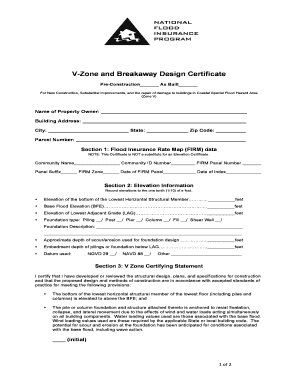
Get C-host V-zone 2
How it works
-

Open form follow the instructions
-

Easily sign the form with your finger
-

Send filled & signed form or save
How to fill out the C-HOST V-ZONE 2 online
Filling out the C-HOST V-ZONE 2 form is a critical step for individuals undertaking construction projects in coastal special flood hazard areas. This guide provides clear and comprehensive instructions to assist users in successfully completing the form online.
Follow the steps to accurately complete the C-HOST V-ZONE 2 form.
- Press the ‘Get Form’ button to access the form and open it in the editing interface.
- Begin by entering the name of the property owner in the designated field. Ensure that this is the official name as it appears on relevant legal documents.
- Fill in the building address, including street, city, state, and zip code. Be precise to avoid any discrepancies.
- Input the parcel number, which is used for identifying the property location in official records.
- In Section 1, provide the community name, community ID number, FIRM panel number, panel suffix, FIRM zone, date of the FIRM panel, and the date of the index. Check for accuracy as these details are crucial for flood risk assessment.
- Proceed to Section 2, where you will record elevation information. Ensure you measure and record the elevations to the nearest one-tenth (1/10) of a foot, including the bottom of the lowest horizontal structural member, base flood elevation, and lowest adjacent grade.
- Select the appropriate foundation type by marking the appropriate box and providing a brief description if necessary. Input the approximate depth of scour/erosion used for the foundation design, and the embedment depth of pilings or foundation below the lowest adjacent grade.
- Indicate the datum used for your measurements by checking the applicable box and specifying if 'Other' is chosen.
- In Section 3, read and certify the V Zone certifying statement. Initial where indicated to affirm that the structural design meets the specified standards.
- Next, move to Section 4 and certify the Breakaway Wall Certification Statement. Confirm each provision and initial where necessary.
- Complete the certification by providing the certifier's name, title, company name, registration number, street address, city, state, zip code, and telephone number. Ensure that the signature and date are accurate.
- Once all sections are completed, review the form for any errors. You can then save changes, download, print, or share the completed form as needed.
Start filling out your C-HOST V-ZONE 2 form online today!
Related links form
Zone 2 training is typically the lowest zone used for training purposes. Think of it as going for a jog while you can still hold a conversation – somewhere between 60-70% of your maximum heart rate. The purpose behind Zone 2 training is to be able to sustain a pace just below your aerobic threshold for 30+ minutes.