Loading
Get Shift Availability
How it works
-

Open form follow the instructions
-

Easily sign the form with your finger
-

Send filled & signed form or save
How to fill out the Shift Availability online
Completing the Shift Availability form is essential for communicating your work schedule preferences. This guide offers clear and supportive instructions to ensure you fill out the form correctly and efficiently.
Follow the steps to complete your Shift Availability form with ease.
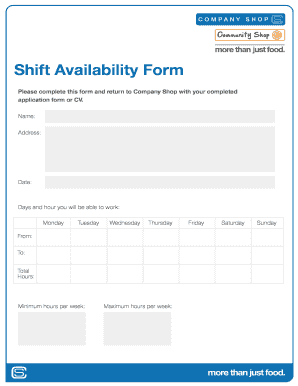
- Press the ‘Get Form’ button to retrieve the Shift Availability form and open it for editing.
- Begin by entering your full name in the designated field. This helps identify your submission.
- Fill in your current address. Providing accurate information ensures effective communication.
- Enter the date on which you are completing the form. This helps track the timeliness of your submission.
- Indicate the days and hours you are available to work by checking the appropriate boxes for each day from Monday to Sunday. Be specific about your availability by entering the 'From' and 'To' times.
- For each day indicated, calculate and enter the total hours you are available to work in the 'Total Hours' field.
- Specify your minimum and maximum hours per week in the respective fields. This information helps in planning work schedules.
- Review all the information you have entered to ensure accuracy and completeness.
- Once you have completed the form, you can save your changes, download, print, or share the form as needed.
Complete your Shift Availability form online today for a streamlined scheduling experience.
In terms of employment, open availability relates to your potential work schedule. With open availability, your employer has more flexibility to create your weekly schedule versus someone with additional responsibilities like a second job, school, or childcare.