Loading
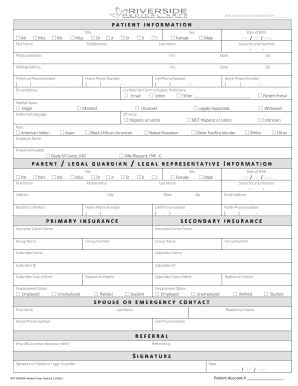
Get Patient Registration And Medical Summary Form - Oakwood Medical
How it works
-

Open form follow the instructions
-

Easily sign the form with your finger
-

Send filled & signed form or save
How to fill out the Patient Registration And Medical Summary Form - Oakwood Medical online
Filling out the Patient Registration and Medical Summary Form online is a crucial step to ensure you receive the appropriate care. This guide will provide clear instructions for each section of the form, making the process straightforward and efficient.
Follow the steps to complete the form correctly.
- Click ‘Get Form’ button to obtain the form and open it in the editor.
- Begin with the 'Patient Information' section. Fill in your title, first name, middle initial, last name, date of birth, and sex. Ensure that you include any suffixes if applicable, such as Jr, Sr, or II.
- Next, provide your social security number, physical address, mailing address (if different), and contact information including preferred phone number, home phone, cell, work numbers, and email address.
- Indicate your preferred method of confidential communication and marital status. It's also important to specify your preferred language and complete the sections on ethnicity and race.
- If applicable, enter your employer's name and preferred healthcare provider. If you have a parent, legal guardian, or legal representative, fill in their information in the designated section.
- Continue to the 'Primary Insurance' and 'Secondary Insurance' sections. Fill in the required details including carrier name, subscriber information, and relationship to the patient. It's important to provide accurate and complete insurance information.
- Complete the 'Spouse or Emergency Contact' section by providing the necessary details of your emergency contact including their relation to you.
- In the 'Referral' section, indicate how you heard about the clinic and provide the name of the person who referred you, if applicable.
- Sign and date the form indicating your consent and acknowledgment of the information provided in the 'Patient Health Information' section.
- Finally, review all entered information for accuracy, save your changes, and proceed to download, print, or share the completed form as needed.
Complete your Patient Registration and Medical Summary Form online today for a streamlined healthcare experience.
Have this information ready when you call to schedule your first appointment: First, middle and last names as they appear on your birth certificate. Date of birth to identify and verify you, as well as differentiate you from other patients who may have the same name. Address. Telephone numbers. Marital status.
Industry-leading security and compliance
US Legal Forms protects your data by complying with industry-specific security standards.
-
In businnes since 199725+ years providing professional legal documents.
-
Accredited businessGuarantees that a business meets BBB accreditation standards in the US and Canada.
-
Secured by BraintreeValidated Level 1 PCI DSS compliant payment gateway that accepts most major credit and debit card brands from across the globe.