Loading
Get Patient Assistance Program (pap) Application - Iluvien
How it works
-

Open form follow the instructions
-

Easily sign the form with your finger
-

Send filled & signed form or save
How to use or fill out the Patient Assistance Program (pap) Application - Iluvien online
Filling out the Patient Assistance Program (pap) Application for Iluvien can be a straightforward process when guided effectively. This guide aims to provide you with clear, step-by-step instructions to help you complete the application accurately and efficiently.
Follow the steps to successfully complete the application online.
- Click the ‘Get Form’ button to access the application form online.
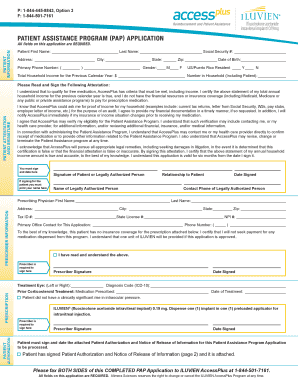
- Begin by entering your patient information in the required fields. Include your first name, last name, and social security number. Make sure to fill out your address, city, state, zip code, date of birth, and primary phone number.
- Provide your gender and confirm if you are a resident of the US or Puerto Rico. Indicate your total household income from the previous calendar year and the number of people in your household, including yourself.
- Read through the patient attestation carefully. It outlines the qualifications required for free medication and your responsibilities regarding financial verification. Sign and date the attestation where indicated.
- Proceed to fill out the prescriber information, including the prescribing physician's first name, last name, address, tax ID number, state license number, and NPI number. Ensure that the primary office contact name and phone number are filled out correctly.
- Within the prescription section, indicate the treatment eye and enter the diagnosis code. Provide details on prior corticosteroid treatment and the medication prescribed. Make sure the prescriber signs and dates this section.
- Complete the patient authorization and notice of release of information section. Read the authorization details carefully and ensure your signature is present along with the date.
- Once all sections of the form have been completed, you can save any changes, download or print the application, and prepare to submit it.
- Finally, fax both sides of the completed application to ILUVIEN AccessPlus at 1-844-501-7161.
Start completing your Patient Assistance Program application online today!
What is (®)? is a prescription medicine called a xanthine oxidase (XO) inhibitor that is used to lower blood uric acid levels in adults with gout. Uric acid comes from substances called purines.