Loading
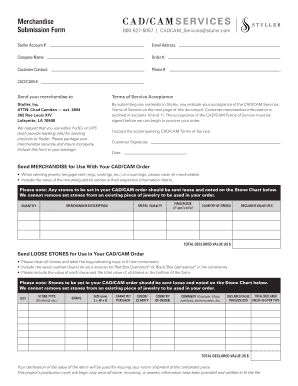
Get Merchandise Submission Form 800-527-5057 Cadcam Services ...
How it works
-

Open form follow the instructions
-

Easily sign the form with your finger
-

Send filled & signed form or save
How to fill out the Merchandise Submission Form 800-527-5057 CADCAM Services online
This guide provides clear and step-by-step instructions for successfully completing the Merchandise Submission Form 800-527-5057 for CADCAM Services online. Whether you are a first-time user or familiar with the process, this document will help you navigate each section with confidence.
Follow the steps to complete your form and ensure a smooth submission process.
- Press the ‘Get Form’ button to acquire the Merchandise Submission Form. Once you access the form, it will open in your preferred digital editor for completion.
- Begin by filling out the Stuller Account number field. If you do not have an existing account, you may need to create one prior to submission.
- Enter your email address in the designated field to ensure any correspondence regarding your submission can be efficiently managed.
- Provide your company name, ensuring it matches any legal documents related to your order.
- Fill in the order number associated with your submission. Ensure this number is accurate to avoid any processing delays.
- Add the customer contact information, including the name of the person who will be handling the submission comments.
- Include the phone number for the customer contact to facilitate any necessary communication regarding the order.
- Input the CAD/CAM number if applicable, facilitating easier tracking and processing of your merchandise.
- Fill in the relevant merchandise details in the sections provided. Include information like quantity, description, metal quality, finger size if applicable, country of origin, and total declared value.
- If you are submitting loose stones, complete the stone chart provided, detailing each stone's type, shape, size, carat weight, color/clarity, country of origin, comments, and declared value.
- Review the Terms of Service acceptance statement carefully. You must acknowledge your acceptance by signing and dating the form.
- Once you have filled out all applicable fields and sections, save your changes, download a copy for your records, and print the form if necessary.
- Finally, securely package your merchandise along with the completed form before sending it to Stuller using a reliable shipping service.
Complete your Merchandise Submission Form online today to simplify your ordering process!
Industry-leading security and compliance
US Legal Forms protects your data by complying with industry-specific security standards.
-
In businnes since 199725+ years providing professional legal documents.
-
Accredited businessGuarantees that a business meets BBB accreditation standards in the US and Canada.
-
Secured by BraintreeValidated Level 1 PCI DSS compliant payment gateway that accepts most major credit and debit card brands from across the globe.