Loading
Get Statement Requisition Form - Mwito Sacco Society
How it works
-

Open form follow the instructions
-

Easily sign the form with your finger
-

Send filled & signed form or save
How to fill out the Statement Requisition Form - Mwito Sacco Society online
Filling out the Statement Requisition Form for Mwito Sacco Society online is a straightforward process. This guide will provide you with step-by-step instructions to ensure that you complete the form accurately and efficiently.
Follow the steps to successfully complete your form online.
- Click ‘Get Form’ button to obtain the form and open it in your preferred editor.
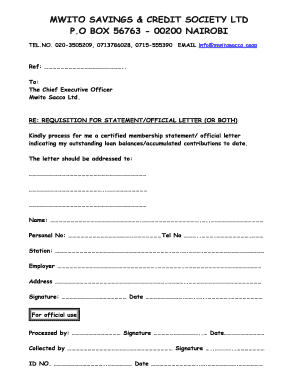
- Begin by filling out the reference line labeled 'Ref' at the top of the form. This is where you can enter any relevant references to help identify your request.
- In the section addressed to 'The Chief Executive Officer', ensure you clearly state the purpose by writing 'REQUISITION FOR STATEMENT/OFFICIAL LETTER (OR BOTH)'.
- Next, request the specific documents you need. For example, mention that you require a certified membership statement or an official letter outlining your outstanding loan balances and accumulated contributions.
- Fill in the address section, ensuring that you provide all necessary details, including the recipient's name and address.
- In the 'Name' field, enter your full name as registered with Mwito Sacco Society.
- Provide your personal number in the designated section, followed by your telephone number to assist with any necessary communication.
- Indicate your station and employer accurately to further verify your identity and membership with Mwito Sacco Society.
- Fill out your complete address in the corresponding section to ensure proper delivery of your statement or letter.
- Finally, sign and date the form at the bottom to confirm your request. Ensure that these details are clearly legible.
- After completing all sections, you may save changes, download, print, or share the form as necessary as per your requirements.
Complete your document online today and ensure your requests are processed smoothly.
How to use our paybill system Open Mpesa--Lipa na Mpesa. Open the mpesa application on your phone and select lipa na mpesa. Paybill. Enter our paybill number: 339650. Enter the account number. (Payroll number,Identity Card number or your Bosa Number) Amount. Enter the amount you want to pay. Enter Pin and Click Send.