Loading
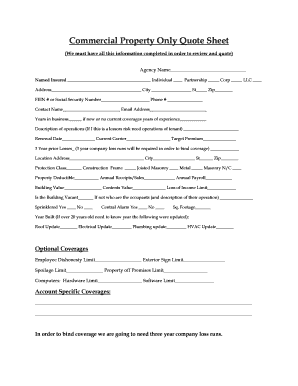
Get Commercial Property Only Quote Sheet
How it works
-

Open form follow the instructions
-

Easily sign the form with your finger
-

Send filled & signed form or save
How to fill out the Commercial Property Only Quote Sheet online
Completing the Commercial Property Only Quote Sheet online is a straightforward process that ensures you provide all necessary information for an accurate quote. This guide will walk you through each section of the form, ensuring that users of all experience levels can confidently fill it out.
Follow the steps to successfully complete the quote sheet.
- Click the 'Get Form' button to obtain the form and open it in your browser.
- Begin by filling in the Agency Name at the top of the form. This identifies the agency handling the property insurance.
- Next, provide the Named Insured details. Specify whether the insured is an Individual, Partnership, Corporation, or LLC by selecting the appropriate option.
- Fill in the Address, City, State, and Zip code of the property to be insured. This ensures the insurance provider recognizes the location.
- Enter the FEIN number or Social Security Number and the contact Phone number. The Contact Name and Email Address fields should also be completed to ensure proper communication.
- Input the Years in business. If the business is new or does not currently have coverages, provide the number of years of relevant experience instead.
- Describe the operations of your business. If it's a lessor's risk, include the operations of the tenant.
- Provide the Renewal Date, name of the Current Carrier, and the Target Premium you are aiming for.
- List the 3-Year prior losses, noting that three years of company loss runs will be required to bind coverage.
- Fill in the Location Address, City, State, and Zip code for the property being insured.
- Indicate the Protection Class and the type of Construction by checking the corresponding boxes.
- Specify the Property Deductible, Annual Receipts/Sales, Annual Payroll, Building Value, Contents Value, and Loss of Income Limit.
- State whether the Building is Vacant. If it is not, describe who the occupants are and their operation.
- Indicate if the building is sprinklered and if a Central Alarm system is present by checking 'Yes' or 'No.'
- Provide the Sq. Footage and the Year Built. If the building is over 20 years old, provide update years for the Roof, Electrical, Plumbing, and HVAC systems.
- In the Optional Coverages section, enter limits for Employee Dishonesty, Exterior Sign, Spoilage, and Property off Premises. Include Hardware and Software Limits as applicable.
- Lastly, complete the Account Specific Coverages section with any additional information necessary.
- After filling out all sections, ensure you review your information and then save changes, download, print, or share the form as required.
Start filling out your Commercial Property Only Quote Sheet online today for a comprehensive insurance quote!
Different types of commercial insurance products include general liability insurance, professional liability, property insurance, and home-based business insurance. Product liability, vehicle insurance, and business interruption insurance are also types of commercial insurance.