We use cookies to improve security, personalize the user experience, enhance our marketing activities (including cooperating with our marketing partners) and for other business use.
Click "here" to read our Cookie Policy. By clicking "Accept" you agree to the use of cookies. Read less
Read more
Accept
Loading
Form preview
  • US Legal Forms
  • Form Library
  • More Forms
  • More Uncategorized Forms
  • Upstox Segment Addition

Get Upstox Segment Addition

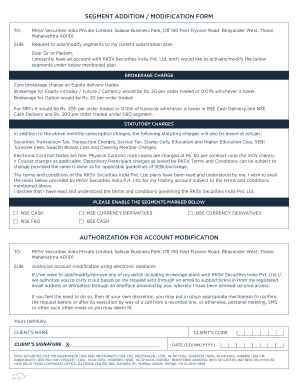
SEGMENT ADDITION / MODIFICATION FORM TO:SUB:Request to add/modify segments to my current subscription plan Dear Sir or Madam, I presently have an account with RKSV Securities India Pvt. Ltd. and I.

How it works

  1. Open form

    Open form follow the instructions

  2. Easily sign form

    Easily sign the form with your finger

  3. Share form

    Send filled & signed form or save

How to fill out the Upstox Segment Addition online

This guide provides clear instructions on how to complete the Upstox Segment Addition form online. Each step is designed to help users understand the process and ensure accurate submission of their requests for adding or modifying trading segments.

Follow the steps to successfully complete the Upstox Segment Addition form.

  1. Locate the ‘Get Form’ button to acquire the Upstox Segment Addition document. Press the button to access the form and open it in your preferred interface.
  2. Review the form’s introductory section which explains the purpose of the request. Ensure that you have your account information accessible for reference.
  3. Fill in your name in the CLIENT’S NAME field and provide your CLIENT’S CODE. This information is crucial for identifying your account.
  4. In the section regarding SEGMENTS, check the boxes corresponding to the segments you wish to add or modify. Include choices such as NSE CASH, NSE F&O, and BSE CURRENCY DERIVATIVES.
  5. Read the brokerage charge and statutory charges carefully. Ensure you understand these fees as they will apply to your account.
  6. In the AUTHORIZATION FOR ACCOUNT MODIFICATION section, confirm your understanding of the authorization process for electronic modifications.
  7. Sign the form in the CLIENT’S SIGNATURE field to authenticate your request and add the date in the format of DD/MM/YYYY.
  8. Once you have completed all sections of the form, save your changes, then consider downloading, printing, or sharing the completed document as required.

Complete your Upstox Segment Addition online today!

Get form

Experience a faster way to fill out and sign forms on the web. Access the most extensive library of templates available.
Get form

Related content

0001140361-17-016372.txt : 20170421 ......
160; In addition, corporate actions with respect to the equity securities underlying...
Learn more
0001140361-17-016372.txt : 20170421 ......
160; In addition, corporate actions with respect to the equity securities underlying...
Learn more

Related links form

Bcal 2129 Annexure 1: Facility Based Maternal Death Review Form Authorisation Request To Collect Test Report Form (TRF) On ... Application Form For A VLIR Funded International Course ...

Questions & Answers

Get answers to your most pressing questions about US Legal Forms API.

Contact support

Log in to the account section on Console and choose the segments you wish to disable and confirm; this will check if you have any open orders or positions. In the absence of any open orders or positions, the segment is deactivated within 5 minutes.

To enable equity, currency and commodity F&O, follow these steps: Login to console.zerodha.com. Click on Account. Click on Segment. Click on the segments to be enabled. Click on Continue. Select the income range and income proof 1 and click on Choose file. Accept the terms and conditions.

When you open a Upstox account, the Equities segment and BSE Mutual Funds are activated by default. So, you can start investing and trading in them instantly. However other segments such as Futures & Options (F&O), Currencies (CUR), and Commodities segments (MCX), are optional.

Step 1: Login to the Upstox app using your 6-digit PIN or Biometrics. Step 2: Once you have logged in, click on the menu in the top left corner. Step 3: Click on 'Activate F&O, MCX'. Step 4: Click on 'Activate Segment' for the segment you want to activate.

Get This Form Now!

Use professional pre-built templates to fill in and sign documents online faster. Get access to thousands of forms.
Get form
If you believe that this page should be taken down, please follow our DMCA take down processhere.

Industry-leading security and compliance

US Legal Forms protects your data by complying with industry-specific security standards.
  • In businnes since 1997
    25+ years providing professional legal documents.
  • Accredited business
    Guarantees that a business meets BBB accreditation standards in the US and Canada.
  • Secured by Braintree
    Validated Level 1 PCI DSS compliant payment gateway that accepts most major credit and debit card brands from across the globe.
Get Upstox Segment Addition
Get form
Form Packages
Adoption
Bankruptcy
Contractors
Divorce
Home Sales
Employment
Identity Theft
Incorporation
Landlord Tenant
Living Trust
Name Change
Personal Planning
Small Business
Wills & Estates
Packages A-Z
Form Categories
Affidavits
Bankruptcy
Bill of Sale
Corporate - LLC
Divorce
Employment
Identity Theft
Internet Technology
Landlord Tenant
Living Wills
Name Change
Power of Attorney
Real Estate
Small Estates
Wills
All Forms
Forms A-Z
Form Library
Customer Service
Terms of Service
Privacy Notice
Legal Hub
Content Takedown Policy
Bug Bounty Program
About Us
Blog
Affiliates
Contact Us
Delete My Account
Site Map
Industries
Forms in Spanish
Localized Forms
State-specific Forms
Forms Kit
Legal Guides
Real Estate Handbook
All Guides
Prepared for You
Notarize
Incorporation services
Our Customers
For Consumers
For Small Business
For Attorneys
Our Sites
US Legal Forms
USLegal
FormsPass
pdfFiller
signNow
airSlate WorkFlow
DocHub
Instapage
Social Media
Call us now toll free:
+1 833 426 79 33
As seen in:
  • USA Today logo picture
  • CBC News logo picture
  • LA Times logo picture
  • The Washington Post logo picture
  • AP logo picture
  • Forbes logo picture
© Copyright 1997-2025
airSlate Legal Forms, Inc.
3720 Flowood Dr, Flowood, Mississippi 39232
Form Packages
Adoption
Bankruptcy
Contractors
Divorce
Home Sales
Employment
Identity Theft
Incorporation
Landlord Tenant
Living Trust
Name Change
Personal Planning
Small Business
Wills & Estates
Packages A-Z
Form Categories
Affidavits
Bankruptcy
Bill of Sale
Corporate - LLC
Divorce
Employment
Identity Theft
Internet Technology
Landlord Tenant
Living Wills
Name Change
Power of Attorney
Real Estate
Small Estates
Wills
All Forms
Forms A-Z
Form Library
Customer Service
Terms of Service
Privacy Notice
Legal Hub
Content Takedown Policy
Bug Bounty Program
About Us
Blog
Affiliates
Contact Us
Delete My Account
Site Map
Industries
Forms in Spanish
Localized Forms
State-specific Forms
Forms Kit
Legal Guides
Real Estate Handbook
All Guides
Prepared for You
Notarize
Incorporation services
Our Customers
For Consumers
For Small Business
For Attorneys
Our Sites
US Legal Forms
USLegal
FormsPass
pdfFiller
signNow
airSlate WorkFlow
DocHub
Instapage
Social Media
Call us now toll free:
+1 833 426 79 33
As seen in:
  • USA Today logo picture
  • CBC News logo picture
  • LA Times logo picture
  • The Washington Post logo picture
  • AP logo picture
  • Forbes logo picture
© Copyright 1997-2025
airSlate Legal Forms, Inc.
3720 Flowood Dr, Flowood, Mississippi 39232