Loading
Get Registration Form For Nts (nat) Test - Comsats
How it works
-

Open form follow the instructions
-

Easily sign the form with your finger
-

Send filled & signed form or save
How to fill out the Registration Form For NTS (NAT) Test - Comsats online
Filling out the Registration Form For NTS (NAT) Test - Comsats is a crucial step for prospective students aiming to secure their admission. This guide provides a comprehensive walkthrough to help you complete the form accurately and efficiently.
Follow the steps to successfully fill out your registration form.
- Click ‘Get Form’ button to obtain the form and open it in the editor.
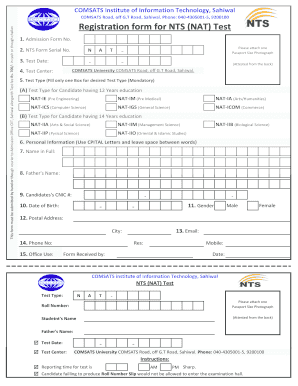
- Begin by entering your Admission Form Number and NTS Form Serial Number in the appropriate fields.
- Select your Test Date. Ensure that it aligns with available test dates provided by the institution.
- Choose your Test Center from the list provided. Make sure to select the location that is most convenient for you.
- Attach a passport-sized photograph, ensuring it is attested from the back as per the instructions.
- In the Test Type section, select only one box corresponding to your educational qualifications. Options include NAT-IE for pre-engineering and NAT-IM for pre-medical, among others.
- Fill in your Personal Information using capital letters, and ensure there are spaces between words. This includes your full name, parent’s name, and CNIC number.
- Input your Date of Birth in the designated format and select your Gender by marking the relevant option.
- Provide your Postal Address, Email, and Phone Number. Ensure that all information is accurate for future correspondence.
- Once all fields are filled out, review the form for any errors or missing information before proceeding to save your changes.
- Finally, save your filled form, and prepare to either download, print, or share the document as needed.
Complete your documents online and make your registration process hassle-free.
If you are a new user, signup / Register for NTS online Registration Portal. Datacell.nts.org.pk (One time only). Once you are registered, login to (Datacell.nts.org.pk) and fill your personal information, academic information, employment information (if any).