Loading
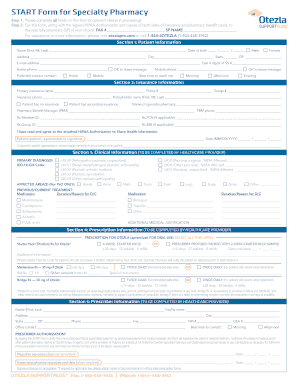
Get Start Form
How it works
-

Open form follow the instructions
-

Easily sign the form with your finger
-

Send filled & signed form or save
How to fill out the Start Form online
Filling out the Start Form online can be a straightforward process when following the right guidelines. This comprehensive guide provides step-by-step instructions to help users complete the form accurately and efficiently.
Follow the steps to successfully complete the Start Form online.
- Click the ‘Get Form’ button to access the Start Form and open it for editing.
- Complete all fields on the form carefully to prevent delays in processing. Ensure that you provide accurate patient information, including name, date of birth, address, and contact details.
- In the insurance information section, provide the primary and secondary insurance details, including policyholder information and the selected specialty pharmacy.
- The healthcare provider should complete the clinical information section, including the primary diagnosis and any previously used treatments. Ensure accuracy in reflecting the patient's current medical status.
- In the prescription information section, the healthcare provider must specify the prescription details, including the type of prescription and any special instructions.
- The prescriber information must be filled out by the healthcare provider with accurate contact details and authorization.
- Once all sections are completed, review the form for any missing information or errors. Save your changes, print, or download the completed form, ensuring you have copies of all required documents.
- Fax the completed Start Form, together with the signed HIPAA Authorization and copies of both sides of the insurance and pharmacy benefit cards, to the chosen specialty pharmacy.
Complete your documents online to ensure a smooth and efficient process.
The Start Form acts as a prescription and enrolls patients in the Aurinia Alliance™ program. aPatient signature required to access Aurinia Alliance support, not to prescribe LUPKYNIS. Recommended starting dose is 3 capsules BID. Please see Prescribing Information for guidance on potential dosing adjustments.