Loading
Get 11-17-16 Altscripts Referral Formsmaster.xlsx
How it works
-

Open form follow the instructions
-

Easily sign the form with your finger
-

Send filled & signed form or save
How to use or fill out the 11-17-16 ALTSCRIPTS REFERRAL FORMSMASTER.xlsx online
Filling out the 11-17-16 ALTSCRIPTS REFERRAL FORMSMASTER.xlsx online is a straightforward process that helps ensure accurate and efficient handling of prescriptions. This guide provides clear instructions to assist you in completing the form with ease.
Follow the steps to fill out the form efficiently and accurately.
- Click ‘Get Form’ button to access the form and open it in your preferred editor.
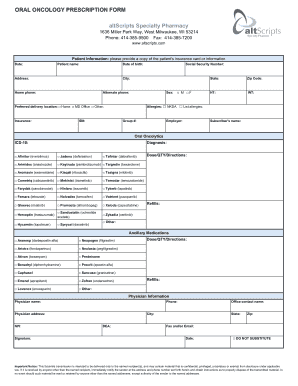
- Begin filling out the Patient Information section. Include the patient’s name, date of birth, address, social security number, and contact details including home and alternate phone numbers. Make sure to specify the patient's sex and preferred delivery location by selecting one of the options provided.
- Provide the patient's insurance information. Fill in the insurance company name, ID number, group number, and the subscriber's name. If applicable, include the employer name as well.
- In the Oral Oncolytics section, mark the appropriate diagnosis code (ICD-10) and select the medication(s) prescribed from the list of available options, noting the dose, quantity, and directions for use. Indicate the number of refills required.
- If there are any ancillary medications needed, check the appropriate boxes, and include the dose, quantity, and directions alongside any refills required.
- Complete the Physician Information section. Input the physician’s name, contact details, address, NPI number, and DEA number. Ensure to obtain the physician's signature and record the office contact name, city, and zip code.
- Before submitting, review all sections for accuracy. Make sure that no fields are left incomplete and verify that all required information is provided.
- Once all the information is filled out, you can save the changes, download the completed form, print it for physical submission, or share it as needed.
Complete your document online today for seamless processing.