Loading
Get Autocheck Vehicle History R...
How it works
-

Open form follow the instructions
-

Easily sign the form with your finger
-

Send filled & signed form or save
How to fill out the AutoCheck Vehicle History Report online
Filling out the AutoCheck Vehicle History Report online provides users with essential information about a vehicle's history. This comprehensive guide will assist you in navigating each section of the form effectively.
Follow the steps to complete your AutoCheck Vehicle History Report.
- Press the ‘Get Form’ button to access the AutoCheck Vehicle History Report form in the online editor.
- Input the vehicle identification number (VIN) into the designated field. This unique code allows AutoCheck to retrieve the vehicle's history. Ensure accuracy to receive the right information.
- Provide the vehicle's details such as the year, make, and model. These fields will help refine the search and generate a report tailored for your specific vehicle.
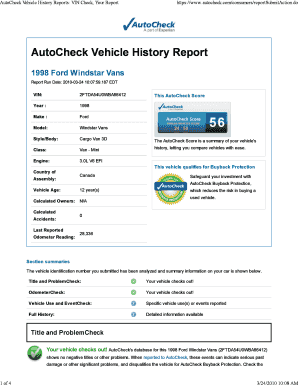
- Review the AutoCheck score presented in the report summary. This score offers a quick glance at the vehicle's history and aids in comparing it against other vehicles.
- Examine the Title and Problem Check section. This area reveals if the vehicle has any negative titles or significant issues. An absence of problems here is a positive indicator.
- Look into the Odometer Check section. Confirm that the odometer readings reported align with previous records to ensure no tampering has occurred.
- Check the Vehicle Use and Event Check section for any reported incidents such as accidents or changes in ownership. Understanding this information is crucial for assessing the vehicle's condition.
- Review the Full History section for chronological details of the vehicle’s events. This section can provide insights into the vehicle's past activations and status.
- Once all fields are completed and reviewed, save your changes. You may also choose to download, print, or share the report for your records or with interested parties.
Start filling out your AutoCheck Vehicle History Report online today for peace of mind in your vehicle purchase.
You can get a free VIN check at the National Insurance Crime Bureau (NICB), VehicleHistory.com or iSeeCars.com/VIN. Just pop in your car's digits and these sites will do the VIN lookup and give you information on the vehicle.
Industry-leading security and compliance
US Legal Forms protects your data by complying with industry-specific security standards.
-
In businnes since 199725+ years providing professional legal documents.
-
Accredited businessGuarantees that a business meets BBB accreditation standards in the US and Canada.
-
Secured by BraintreeValidated Level 1 PCI DSS compliant payment gateway that accepts most major credit and debit card brands from across the globe.