Ct only one payment By filling out this section, you are electing your Retirement Payment Option and designating your beneficiary. option: Option 1, Option 2, Your payment option election and lifetime beneficiary(ies) designation is irrevocable unless you request a change within Option 2W, Option 3, Option 3W, the Unmodified Allowance Option, or one of the Option 4 types. 30 days of the issuance of your first benefit check or you have a future qualifying event. Along with your option select.
Loading

Open form follow the instructions

Easily sign the form with your finger

Send filled & signed form or save
How to fill out the CA PERS-BSD-369-D online
This guide provides a comprehensive overview of how to fill out the CA PERS-BSD-369-D form online. Designed to assist users, this step-by-step guide will help you navigate each section of the application effectively.
Follow the steps to complete your application successfully.
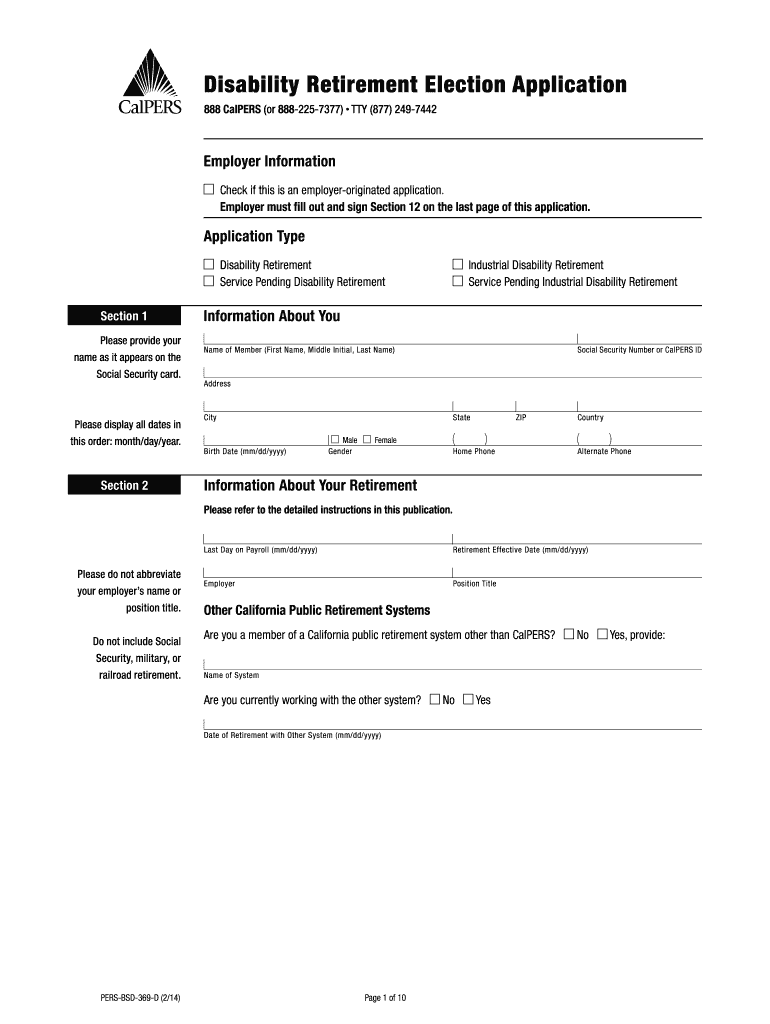
- Press the ‘Get Form’ button to access the CA PERS-BSD-369-D form. This will allow you to open the document in an appropriate editor for further completion.
- Begin with the 'Employer Information' section. If this is an employer-originated application, check the corresponding box. Ensure your employer fills out and signs Section 12 located on the last page.
- In the 'Application Type' section, select the type of disability retirement for which you are applying by checking the relevant box.
- Proceed to Section 1. Enter your full name as it appears on your Social Security card. Please ensure that all dates are formatted as month/day/year.
- Complete Section 2 by providing personal details, including your address, date of birth, and gender. Provide a valid Social Security Number or CalPERS ID and include your contact information.
- In Section 3, describe your specific disability and provide details regarding when and how it occurred. Answer questions regarding your limitations and how they affect your job performance.
- For Section 4, only complete it if a third party caused your injury by checking 'Yes' and providing the necessary details about your treating physician.
- In Section 5, select your retirement payment option and designate your beneficiaries as per your chosen option. Ensure you complete any additional required subsections as indicated.
- Fill out Section 6 to designate recipients for your lump sum Retired Death Benefit, ensuring you provide necessary personal details for each beneficiary.
- Answer the questions in Section 7 regarding your marital and family status to complete your Survivor Continuance details.
- In Section 9, choose your tax withholding preferences for federal and state taxes, following instructions on how to specify your allowances.
- Complete Section 11 by providing your signature and any necessary partner signatures. Ensure all signatures are notarized or witnessed by an authorized representative.
- Finally, review your completed form for any missing information and errors. You can save changes, download, print, or share the form as needed.
Start completing your CA PERS-BSD-369-D form online today!
Experience a faster way to fill out and sign forms on the web. Access the most extensive library of templates available.
Related content
Aug 30, 2025 — filing a Disability Retirement Election Application (PERS-BSD-369-D)...
Your Service Retirement Election Application is the main form you will need to apply for...
Feb 1, 2011 — O equipamento imprime trabalhos de impressão de formato personalizado de...
Get answers to your most pressing questions about US Legal Forms API.
What is California state deferred compensation plan?
The California state deferred compensation plan is a retirement savings program designed to help employees save for retirement on a tax-deferred basis. It allows participants to set aside a portion of their salary to invest in a variety of vehicles, increasing their financial security for the future. This plan complements other retirement benefits, ensuring a more robust financial strategy. For a deeper dive into this program, look into CA PERS-BSD-369-D.
What is the 6 month rule for CalPERS?
The 6 month rule for CalPERS refers to the requirement that retirees cannot return to work in a position eligible for CalPERS benefits within six months of retirement. This rule helps ensure beneficiaries receive their retirement benefits without conflict. Understanding this rule is crucial for planning post-retirement employment options. For additional insights and detailed information about this rule, refer to CA PERS-BSD-369-D.
What is the deferred compensation plan in California?
The deferred compensation plan in California allows state employees to save a portion of their income before taxes, promoting financial security for retirement. This plan is essential for building additional savings, as it can defer taxes until withdrawal. It offers various investment options, empowering employees to choose a strategy that aligns with their long-term financial goals. Consider reviewing the details of CA PERS-BSD-369-D for a comprehensive understanding of these benefits.
Is PERS Gold an HMO or PPO?
PERS Gold is categorized as a PPO, or Preferred Provider Organization, under the CalPERS program. This means you have the flexibility to choose your healthcare providers without requiring a referral from a primary care doctor. With PERS Gold, members enjoy broader access to medical services and specialists, making it easier to find the care that fits their needs. For more information on healthcare options, you can explore resources related to CA PERS-BSD-369-D.
How do I file for permanent disability in California?
Filing for permanent disability in California involves submitting a claim to the appropriate agency, typically through your employer or the state's workers' compensation system. You will need to provide medical records and other supporting documentation. For a thorough understanding of the process, consulting CA PERS-BSD-369-D can offer valuable insights and guidance.
How do I file a statement of Information for an S Corp?
To file a statement of information for an S Corporation in California, you need to submit the appropriate form to the Secretary of State. This form requires basic information about your S Corp, including its address and officers. Utilizing resources like CA PERS-BSD-369-D can help ensure your application is complete and correct.
How to file California corporate disclosure statement online?
Filing a California corporate disclosure statement online is straightforward. You can access the California Secretary of State's website to complete this process. By leveraging the CA PERS-BSD-369-D guidelines, you will ensure that your disclosure statement meets all necessary requirements without any hassle.
Can I submit my CalPERS retirement application online?
You can submit your CalPERS retirement application online, streamlining your retirement process. The online application provides an efficient way to ensure all necessary information is accurately captured. For guidance, checking out resources related to CA PERS-BSD-369-D could be beneficial as you prepare your submission.
Can you file CA statement of Information online?
Yes, you can file the CA statement of information online through the California Secretary of State's website. This online process is designed to be user-friendly, enabling you to submit your information quickly. Additionally, using the CA PERS-BSD-369-D reference can help you navigate any specific requirements effectively.
How often do you file a statement of Information for a corporation in California?
In California, you must file a statement of information for your corporation every year. This requirement helps maintain updated records with the Secretary of State. The filing ensures that stakeholders can access essential information, thereby promoting transparency. You can conveniently use CA PERS-BSD-369-D for guidance on how to complete this process accurately.
Use professional pre-built templates to fill in and sign documents online faster. Get access to thousands of forms.
If you believe that this page should be taken down, please follow our DMCA take down process here.