Loading
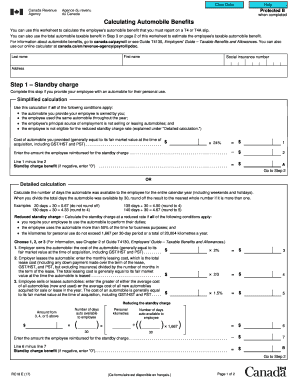
Get Rc18 Calculating Automobile Benefits - Canada.ca
How it works
-

Open form follow the instructions
-

Easily sign the form with your finger
-

Send filled & signed form or save
How to use or fill out the RC18 Calculating Automobile Benefits - Canada.ca online
This guide provides a comprehensive overview of the RC18 Calculating Automobile Benefits form used in Canada to report automobile benefits on T4 or T4A slips. It includes step-by-step instructions to assist users in accurately completing the form online.
Follow the steps to fill out the form correctly.
- Click ‘Get Form’ button to obtain the form and open it in the desired editor.
- Enter the employee's last name, first name, social insurance number, and address in the appropriate fields.
- Complete Step 1 - Standby charge. If the automobile is provided for personal use, choose between simplified calculation or detailed calculation based on provided criteria, and enter the required financial details.
- If using the simplified calculation, input the cost of the automobile provided and any reimbursement by the employee. Calculate the standby charge benefit accordingly.
- If opting for the detailed calculation, determine the total days the automobile was available and follow the guidelines to calculate the standby charge based on the conditions provided.
- Move to Step 2 - Operating expense benefit. If you pay for operating expenses related to personal use, determine if the employee reimbursed for expenses and proceed with fixed rate or optional calculation based on the criteria noted.
- For fixed rate calculation, input the personal kilometres driven by the employee to calculate the operating expense benefit.
- If using the optional calculation, consider the standby charge amount and employee reimbursements to determine the net operating expense benefit.
- In Step 3, enter the total automobile taxable benefit by summing the applicable standby charge benefit and operating expense benefit.
- After completing the form, review all entries for accuracy. Save your changes, and proceed to download, print, or share the completed form as required.
Complete your documents online for more efficient processing today.
When the automobile is leased by the employer, the standby charge is: 2/3 x monthly lease costs (excluding insurance) x # of months available to the employee in the year. Automobile benefits can be calculated using CRA's Automobile Benefits Online Calculator, or by using Form RC18, Calculating Automobile Benefits.
Industry-leading security and compliance
US Legal Forms protects your data by complying with industry-specific security standards.
-
In businnes since 199725+ years providing professional legal documents.
-
Accredited businessGuarantees that a business meets BBB accreditation standards in the US and Canada.
-
Secured by BraintreeValidated Level 1 PCI DSS compliant payment gateway that accepts most major credit and debit card brands from across the globe.