Loading
Get Airman Rank Insignia
How it works
-

Open form follow the instructions
-

Easily sign the form with your finger
-

Send filled & signed form or save
How to fill out the Airman Rank Insignia online
This guide provides comprehensive instructions for users seeking to fill out the Airman Rank Insignia online. Follow the steps below to ensure accurate and complete submission.
Follow the steps to successfully complete the Airman Rank Insignia form online.
- Press the ‘Get Form’ button to access the form and open it in your browser.
- Begin by entering your name in the designated field. Ensure that your full legal name is accurately reflected, as this will be used for official records.
- In the next field, input your rank from the dropdown menu. This is essential for identifying your current standing within the Air Force hierarchy.
- Provide your service number in the specified section. This number is unique to you and must be filled out correctly to avoid any processing delays.
- You may need to include your contact information. Enter your phone number and email address, ensuring that they are up to date for future correspondence.
- Review each section of the form for accuracy. Once you have confirmed that all information is correct, you can save your changes.
- After saving, you have the option to download, print, or share the completed form as required.
Complete your Airman Rank Insignia form online today to ensure a smooth and efficient process.
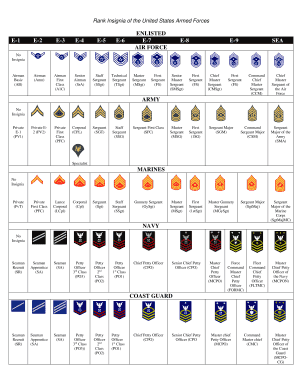
Air Force Ranks: Airman (E-1 through E-4) Airman (E-2) ... Airman First Class (E-3) ... Senior Airman (E-4) ... Staff Sergeant (E-5) ... Technical Sergeant (E-6) ... Master Sergeant (E-7) ... Senior Master Sergeant (E-8) ... Chief Master Sergeant (E-9)