Loading
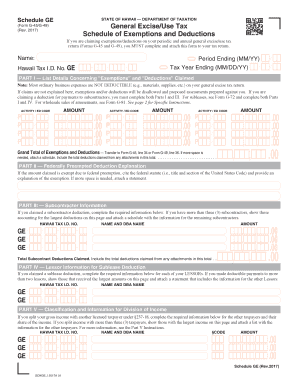
Get Schedule Ge, Rev 2017, General Excise/use Tax Schedule Of Exemptions And Deductions. Form 2017
How it works
-

Open form follow the instructions
-

Easily sign the form with your finger
-

Send filled & signed form or save
How to fill out the Schedule GE, Rev 2017, General Excise/Use Tax Schedule Of Exemptions And Deductions. Form 2017 online
Filling out the Schedule GE, Rev 2017, is essential for claiming exemptions and deductions related to your general excise/use tax return. This guide provides step-by-step instructions to help users understand each section of the form and complete it accurately online.
Follow the steps to successfully fill out the Schedule GE, Rev 2017.
- Press the ‘Get Form’ button to access the form and open it in your preferred online editor.
- Enter the period ending date in MM/YY format and your name in the designated fields. Additionally, input the tax year ending date in MM/DD/YY format along with your Hawaii Tax I.D. number.
- In Part I, list details concerning the exemptions and deductions claimed. For each activity, enter the corresponding activity code and the related exemption/deduction code in the appropriate columns.
- Record the total amount of the exemption or deduction claimed for each activity in the designated fields. Ensure that you provide clear explanations for each claim, as failure to do so may lead to disallowance.
- Complete Part II, if applicable, providing explanations for federally preempted deductions including the relevant federal statute citation.
- If claiming a subcontractor deduction, proceed to Part III and list the required information for up to three subcontractors. Include the relevant Hawaii Tax I.D. number, name, and amount.
- For any sublease deductions claimed, complete Part IV with details for your lessors, providing the necessary information for each.
- In Part V, if applicable, identify taxpayers with whom you split gross income. Input the necessary details regarding each taxpayer, including their share of the income.
- Upon completing the form, review all entries for accuracy and completeness. You can then save changes, download, print, or share the completed form as needed.
Complete your Schedule GE online to ensure that your exemptions and deductions are properly claimed.
To request a form by mail or fax, you may call our Taxpayer Services Form Request Line at 808-587-4242 or toll-free 1-800-222-3229.
Industry-leading security and compliance
US Legal Forms protects your data by complying with industry-specific security standards.
-
In businnes since 199725+ years providing professional legal documents.
-
Accredited businessGuarantees that a business meets BBB accreditation standards in the US and Canada.
-
Secured by BraintreeValidated Level 1 PCI DSS compliant payment gateway that accepts most major credit and debit card brands from across the globe.