Loading
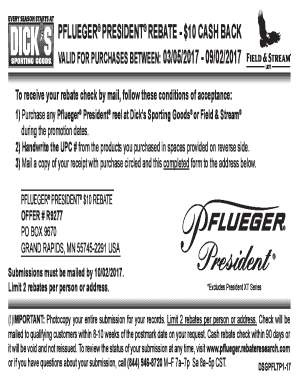
Get Pflueger President Rebate
How it works
-

Open form follow the instructions
-

Easily sign the form with your finger
-

Send filled & signed form or save
How to fill out the Pflueger President Rebate online
This guide provides detailed instructions on completing the Pflueger President Rebate form online. Follow the steps outlined below to ensure your rebate submission is accurate and successful.
Follow the steps to complete your rebate submission.
- Click ‘Get Form’ button to obtain the rebate form and open it in the designated editor.
- Handwrite the 12-digit UPC number from the Pflueger President reel packaging in the provided space on the form. Ensure that this number is accurate to qualify for the rebate.
- Fill in your name in the designated field. Make sure to provide your full legal name as registered.
- Enter your complete address, avoiding P.O. Boxes as specified. Include the city, state, and zip code to ensure proper delivery of your rebate.
- Provide your email address and phone number in the designated fields. This information may be used to contact you regarding your rebate status.
- Indicate your interest in receiving further information and offers from Pflueger by checking the appropriate box if desired.
- Review all entered information for accuracy. Ensure that all required fields are filled out correctly to prevent delays in processing.
- Save changes to the completed form, then print a copy for your records.
- Mail a copy of your receipt with your purchase circled along with the completed rebate form to the specified address: PFLUEGER® PRESIDENT® $10 REBATE, PO BOX 9670, GRAND RAPIDS, MN 55745-2291 USA, ensuring it is postmarked by the submission deadline.
Complete your Pflueger President Rebate form online today and enjoy your cash back!
Pflueger® warrants to the original purchaser that its Pflueger® products are free from defects in materials or workmanship for a period of one (1) year from the date of purchase.