Loading
Get Eu826016933
How it works
-

Open form follow the instructions
-

Easily sign the form with your finger
-

Send filled & signed form or save
How to fill out the Eu826016933 online
The Eu826016933 form is essential for processing VAT invoices effectively. This guide provides a clear, step-by-step approach to help you complete the form online with confidence.
Follow the steps to successfully complete your VAT invoice form.
- Press the ‘Get Form’ button to access the Eu826016933 form. This will allow you to open the document in your preferred editing software.
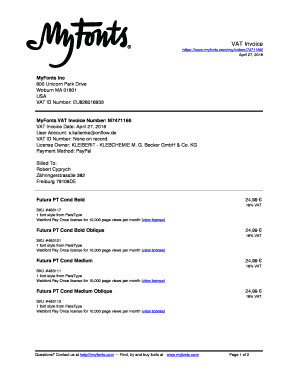
- Begin by entering your VAT ID number, which, in this case, is EU826016933. Ensure that this number is accurate to avoid any discrepancies in your invoice.
- Input the invoice date, which is April 27, 2016. It is crucial that the date reflects the actual transaction to maintain proper documentation.
- Fill in the details for the user account holder or recipient of the invoice. This includes name, address, and contact information. For example, in this document, the recipient is Robert Cyprych, residing at Zähringerstrass3e 382, Freiburg 79108DE.
- List the invoice items, including the font styles purchased. Specify each item’s SKU, quantity, and the type of license. In this invoice, several styles from ParaType are detailed along with their corresponding SKU numbers.
- Calculate the subtotal for each item and accurately apply the applicable VAT rate. For example, each item has a price of 24.99 €, and the VAT is set at 19%.
- Sum the subtotal and the VAT to determine the total amount due. The total should include all products and their respective taxes, as shown in the document.
- Review all entered information carefully to ensure accuracy. When satisfied, you can save your changes, download the completed invoice, print it, or share it as needed.
Start completing your VAT invoices online now to streamline your documentation process.
You can use the European Commission website to validate your VAT Identification Number and member information. To validate your VAT Identifications Number, click on the link below and follow the steps: http://ec.europa.eu/taxation_customs/vies/vatRequest.html.
Industry-leading security and compliance
US Legal Forms protects your data by complying with industry-specific security standards.
-
In businnes since 199725+ years providing professional legal documents.
-
Accredited businessGuarantees that a business meets BBB accreditation standards in the US and Canada.
-
Secured by BraintreeValidated Level 1 PCI DSS compliant payment gateway that accepts most major credit and debit card brands from across the globe.