Loading
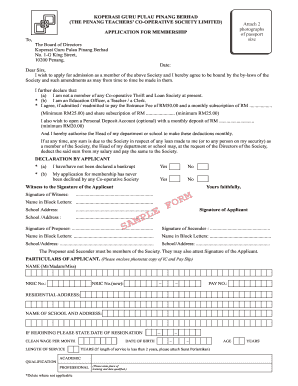
Get Koperasi Guru Pulau Pinang
How it works
-

Open form follow the instructions
-

Easily sign the form with your finger
-

Send filled & signed form or save
How to fill out the Koperasi Guru Pulau Pinang online
Filling out the Koperasi Guru Pulau Pinang application form online is a straightforward process. This guide provides you with clear, step-by-step instructions to ensure that your application is completed correctly and efficiently.
Follow the steps to successfully complete the application form.
- Press the ‘Get Form’ button to acquire the application form and open it for editing.
- Begin by entering the date at the top of the form. This should reflect the day you are filling out the application.
- In the greeting section, address the board of directors by typing 'Dear Sirs'. This formal greeting is standard for applications.
- Indicate your intention to apply for membership in the space provided. You should state your agreement to abide by the society's by-laws.
- Complete the declaration by confirming that you are not a member of any Co-operative Thrift and Loan Society. This is a mandatory statement for your application.
- Choose your profession from the provided options, marking either Education Officer, Teacher, or Clerk.
- Fill in the required amounts for the entrance fee, monthly subscription, and share subscription. Ensure that these amounts meet the minimum requirements.
- If you wish to open a Personal Deposit Account, state the desired monthly deposit, ensuring it meets the minimum deposit criteria.
- You must authorize your head of department/school to make monthly deductions by signing in the designated section.
- Complete the declaration section regarding whether you have been declared bankrupt and if your application has ever been declined by any co-operative society.
- A witness must sign the application to confirm your signature. This can be someone who is a member of the society.
- Fill out your personal particulars in the designated section, including name, NRIC number, residential address, school name, and any additional information required.
- Attach two recent passport-sized photographs to the application as required.
- Seek confirmation from an authorized individual at your school (Guru Besar, Pengetua, or Pengarah) regarding your status and have them sign the confirmation section.
- Before submitting, review all entries for accuracy. Make necessary corrections if errors are found.
- Save your completed application, and if necessary, download or print it for your records or submission.
Complete your Koperasi Guru Pulau Pinang application online today to secure your membership benefits.
Industry-leading security and compliance
US Legal Forms protects your data by complying with industry-specific security standards.
-
In businnes since 199725+ years providing professional legal documents.
-
Accredited businessGuarantees that a business meets BBB accreditation standards in the US and Canada.
-
Secured by BraintreeValidated Level 1 PCI DSS compliant payment gateway that accepts most major credit and debit card brands from across the globe.