Loading
Get Canada Homestay Network
How it works
-

Open form follow the instructions
-

Easily sign the form with your finger
-

Send filled & signed form or save
How to fill out the Canada Homestay Network online
Filling out the Canada Homestay Network's request for refund form can seem daunting, but with a structured approach, it becomes manageable. This guide provides clear, step-by-step instructions to help users complete their forms accurately and efficiently.
Follow the steps to complete your refund request form.
- Click ‘Get Form’ button to access the request for refund form and open it in your preferred editor.
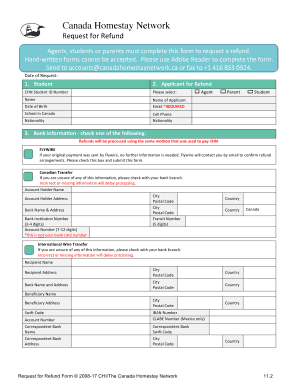
- Begin filling out the 'Date of Request' section with the current date. Ensure that this date is accurate as it may impact the processing of your refund.
- Proceed to the 'Student' section. Enter the CHN Student ID Number, and fill in the student's full name, date of birth, school in Canada, and nationality. This information helps identify the student associated with the refund.
- In the 'Applicant for Refund' section, input the name and email address of the person requesting the refund. Please ensure that the email address is current to receive any updates regarding the refund status.
- Select the appropriate relationship with the student by checking the relevant box for agent, parent, or student.
- Moving to the 'Bank Information' section, choose the applicable refund method: Flywire, Canadian transfer, or international wire transfer. Providing accurate bank information is essential for the timely processing of your refund.
- If you selected Flywire, check the confirmation box indicating your payment was made via this method and that no further information is required.
- If choosing Canadian transfer or international wire transfer, fill out the required bank details, including the account holder name, account number, and transit number for Canadian transfers. For international wire transfers, complete the beneficiary and correspondent bank information as needed.
- Once all sections are accurately filled, review the entire form to ensure all information is correct and complete, as inaccuracies may delay processing.
- Finally, once the form is finished, you may save changes, download, print, or share the completed form as needed. Then, submit the form via email to accounts@canadahomestaynetwork.ca or fax to +1 416 853 0924.
Take the next step in your refund process and complete the Canada Homestay Network form online today.
Related links form
A Homestay Acts as a Home Away from Home A child's host family will be their home away from home while studying abroad. For many children, it might be their first time living away from family. It's common to experience feelings of home sickness and staying with a host family can help combat this.