: Company Name Preparer Name Date Prepared Part II – Description of the Generating Facilities A. Variances from Distribution Interconnection Handbook (DIH) and Greenbook Requirements (check one): Generating Facilities must meet the DIH and Greenbook requirements, available at www.pge.com/dih and www.pge.com/greenbook. A Variance Request must be submitted with the application for deviations, i.e. lineside tap, AC Disconnect > 10 ft from PG&E meter. (See Part III Section B for information on .

Open form follow the instructions

Easily sign the form with your finger

Send filled & signed form or save
How to fill out the CA PGE 79-1151B online
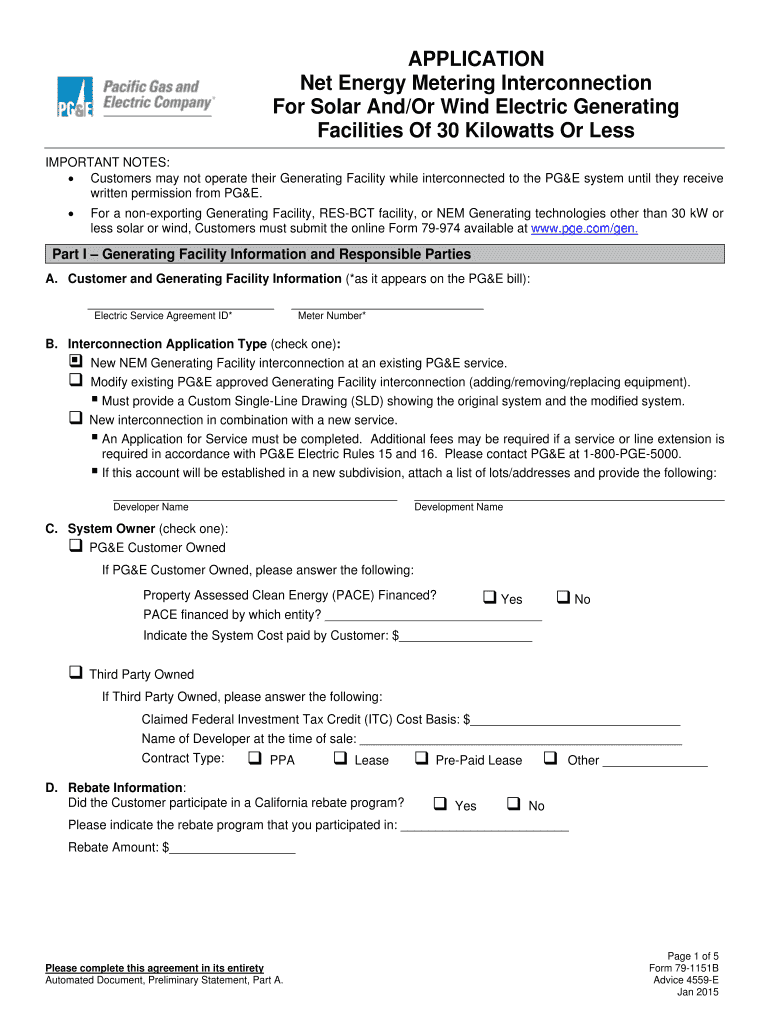
The CA PGE 79-1151B form is essential for individuals looking to interconnect their solar or wind generating facilities with PG&E's system. This guide provides a step-by-step approach to assist users in completing the form accurately and efficiently, especially when submitting online.
Follow the steps to successfully complete the CA PGE 79-1151B form online.
- Click the ‘Get Form’ button to obtain the form and open it in your preferred online editor.
- In Part I, fill out the Generating Facility Information and Responsible Parties. Include your Electric Service Agreement ID and Meter Number as they appear on your PG&E bill.
- Select the Interconnection Application Type by checking one of the provided options. This indicates whether you are applying for a new interconnection, modifying an existing one, or combining with a new service.
- Indicate the System Owner by choosing whether it is PG&E Customer Owned or Third Party Owned. If owned by a Third Party, provide additional details regarding the tax credit and contract type.
- Fill out the Contractor Information section, listing the name and details of the company installing the system, including license number and contact information.
- Complete the Preparer of this Application section if someone other than the PG&E Customer is filling out the form. Ensure that this individual is authorized to act on behalf of the customer.
- In Part II, describe the Generating Facilities. State whether your project meets the Distribution Interconnection Handbook and Greenbook Requirements or requires a Variance Request.
- Provide detailed information about the Photovoltaic or Wind Turbine Generating Facility, including manufacturer details, model numbers, and technical specifications.
- In Part III, ensure you have the necessary documents, such as the Net Energy Metering Interconnection Agreement and any required variance requests.
- Review the entire form to ensure all fields are completed accurately. Once verified, you can save your changes, and options to download, print, or share the completed form will be available.
Complete your CA PGE 79-1151B form online today for a smooth interconnection process.
Experience a faster way to fill out and sign forms on the web. Access the most extensive library of templates available.
Related content
Jul 28, 2021 — 79-1137-02). 4. Both the Agreement and Customer Authorization...
CIA and Big Event. Introduction by Congressman Henry Gonzalez.
Feb 5, 2017 — The Model S33/A Disk Controller emulates the functions and operations of...
Get answers to your most pressing questions about US Legal Forms API.
How to get PGE service?
Getting PG&E service is a straightforward process that starts with an online application. With CA PGE 79-1151B, you can fill out your details on their official website or contact customer support for assistance. After your application is submitted, PG&E will schedule the necessary appointments for service activation. You can also use uslegalforms platform to simplify the documentation process and ensure everything is filled out correctly.
What is the PG&E net metering program?
The PG&E net metering program allows you to earn credits on your electricity bill when you generate excess power through renewable energy sources like solar panels. With CA PGE 79-1151B, participants can substantially lower their energy costs while contributing to environmental sustainability. This program offers a seamless integration of renewable resources into home energy solutions. You can learn more about eligibility and application by visiting the PG&E site.
How much is the deposit for PGE?
The deposit for PGE services varies based on your specific situation and credit history. Generally, the deposit amounts are outlined clearly when you open your account, and for many customers, it can be waived based on established eligibility criteria. Understanding the deposit requirements is crucial, especially if you are exploring options under the CA PGE 79-1151B regulation. If you have concerns, consider using resources from the USLegalForms platform to navigate PGE's offerings.
What are the rules for PGE net metering?
PGE net metering allows you to get credit for the excess electricity your solar system produces. Under the CA PGE 79-1151B regulations, system owners receive credits which offset their energy costs. It is essential to understand the production limits and the type of renewable resources eligible for this program. Staying informed about your net metering options can significantly benefit your energy savings.
How do I put PGE under my name?
To put PG&E service under your name, you need to complete a service application either online or by contacting customer service. You'll need to provide personal information, including your Social Security number and a valid ID. Once processed, PG&E will send you a confirmation of the account setup. For assistance with this process and to ensure you meet all requirements related to CA PGE 79-1151B, you can utilize the tools offered by our platform.
How is PG&E bill calculated?
The PG&E bill calculation involves several factors including your electricity usage, the rate plan you are on, and any applicable fees. The basic formula includes the amount of energy consumed in kilowatt-hours multiplied by the rate charged per kilowatt-hour. Additionally, customers may see charges for public purpose programs and taxes. Understanding your bill in relation to CA PGE 79-1151B can help you manage your consumption and costs more effectively.
How to get a refund from PGE?
To request a refund from PGE, gather your account information and any relevant documentation supporting your claim. Then, contact PGE's customer service either by phone or through their official website. They will guide you through the refund process, ensuring you understand the necessary steps to resolve your billing inquiries linked to CA PGE 79-1151B.
Why did I get a check from PGE?
Receiving a check from PGE typically signifies a reimbursement for overpaid bills or compensation for renewable energy credits. If you recently participated in any PGE programs or adjustments, this could also be a result of that involvement. Always verify your billing statements to ensure accurate calculations related to your account under CA PGE 79-1151B.
How long will NEM 2.0 last in California?
NEM 2.0 is expected to remain in effect until the new NEM 3.0 rules are fully implemented, which could take some time. Current participants can benefit from the existing compensation structure for a specified period, typically around 20 years. Staying informed about changes in the NEM programs will help you adjust your energy strategies effectively.
How much do I get for selling electricity back to the grid?
The amount you receive for selling electricity back to the grid varies based on your energy generation and current market rates. Generally, you can expect compensation per kilowatt-hour, and this rate may differ depending on your participation in NEM programs. Understanding the specifics of CA PGE 79-1151B can help you maximize your earnings from this renewable energy initiative.
Use professional pre-built templates to fill in and sign documents online faster. Get access to thousands of forms.
If you believe that this page should be taken down, please follow our DMCA take down process here.