Loading
Get Ieapp
How it works
-

Open form follow the instructions
-

Easily sign the form with your finger
-

Send filled & signed form or save
How to use or fill out the Ieapp online
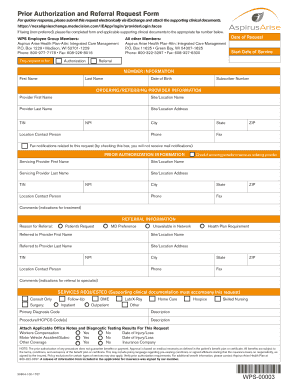
Filling out the Ieapp form online can be a straightforward process if you follow the outlined steps carefully. This guide will provide you with clear instructions to complete each section of the form efficiently.
Follow the steps to successfully fill out the Ieapp form online.
- Press the ‘Get Form’ button to access the document and open it in the editor.
- Begin by entering the date of your request and the start date of the service in the specified fields. Ensure the accuracy of the dates as they are critical for processing.
- In the member information section, provide the first name, last name, date of birth, and subscriber number of the member requiring authorization or referral.
- Fill out the ordering/referring provider information with the relevant details, including the provider's first and last name, site/location name, address, TIN, NPI, city, state, and contact information.
- In the prior authorization section, repeat the steps of entering the servicing provider’s details if they are different from the ordering provider, or check the box indicating the servicing provider is the same.
- Provide the referral information by stating the reason for the referral and entering the referred provider’s details, following the same format as the previous sections.
- In the services requested section, select the appropriate services and attach any supporting clinical documentation required for this request.
- After completing the form, review all entries for correctness. You can then save changes, download, print, or share the completed form as needed.
Complete your Ieapp form online today to ensure a smooth submission process.