Loading
Get Pop Bank Online Banking Authentication
How it works
-

Open form follow the instructions
-

Easily sign the form with your finger
-

Send filled & signed form or save
How to fill out the POP Bank online banking authentication online
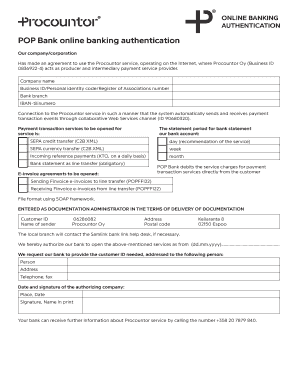
This guide provides users with clear instructions on how to complete the POP Bank online banking authentication form. By following the step-by-step process outlined here, you will ensure that all necessary information is accurately provided for effective online banking services.
Follow the steps to successfully complete the online banking authentication form.
- Press the ‘Get Form’ button to obtain the POP Bank online banking authentication form and open it in your preferred editor.
- Fill in the company name and ensure it matches the name registered with the bank.
- Enter the business ID or personal identity code or Register of Associations number as applicable.
- Specify the bank branch where the account is held.
- Provide your IBAN account number accurately for verification.
- Indicate the types of payment transaction services you would like to open, by selecting the appropriate checkboxes for SEPA credit transfer, SEPA currency transfer, incoming reference payments, and bank statement as line transfer.
- Select the preferred statement period for your bank account: day, week, or month, based on your service needs.
- If applicable, indicate your preferences for e-invoice agreements including sending and receiving Finvoice e-invoices.
- Specify the customer ID and the name of the sender (Procountor Oy) along with relevant address and postal code information.
- Provide the date from which the bank services are to be authorized.
- List the person to whom the customer ID should be addressed, along with their address and contact information.
- Complete the form by signing it and printing your name. Include the place and date of signing.
- Finally, review all information for accuracy, and proceed to save changes, download, print, or share the completed form as necessary.
Complete your documents online to ensure a streamlined banking experience.
Related links form
Authentication is the process of verifying a user's identity and their ability to access a requested account. For instance, entering online banking credentials (username/password) or answering security questions authenticates a user by identifying her and verifying that she is who she claims to be.