Loading
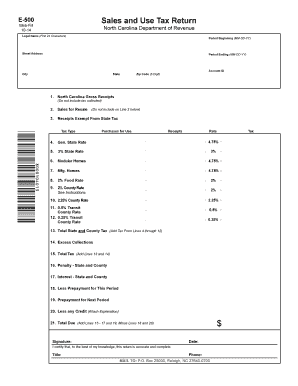
Get E 500 Web Fill
How it works
-

Open form follow the instructions
-

Easily sign the form with your finger
-

Send filled & signed form or save
How to fill out the E 500 Web Fill online
Completing the E 500 Web Fill can seem daunting, but with clear guidance, you can navigate this form with ease. This step-by-step guide will help users successfully fill out the North Carolina Sales and Use Tax Return, ensuring all necessary information is accurately provided.
Follow the steps to accurately complete the E 500 Web Fill.
- Press the ‘Get Form’ button to access the E 500 Web Fill document, which will open for editing.
- Begin by entering your legal name in the first 24 characters of the designated field. This should reflect the name under which your business is registered.
- Input the period beginning date in the format MM-DD-YY, signifying the start of the filing period for which you are submitting the tax return.
- Fill in your street address, followed by the city, state, and zip code, ensuring that all details match your business records.
- Enter your Account ID in the appropriate field. This is a unique identifier provided by the North Carolina Department of Revenue.
- Proceed to line 1 where you will input your North Carolina gross receipts. Be sure not to include any tax collected in this figure.
- In line 2, report sales for resale. This figure should not be included in line 3, where you will detail receipts exempt from state tax.
- On line 3, enter the total for receipts that are exempt from state tax, including the applicable tax type for your transactions.
- Lines 4 through 12 require calculations based on various state and county tax rates. Carefully enter the relevant amounts for each line, ensuring to multiply the receipts by the respective tax rates available.
- At line 13, sum the tax amounts from lines 4 through 12 to determine the total state and county tax owed.
- Continue to lines 14 through 20, inputting any excess collections, total taxes, penalties, interest, prepayments, and credits that apply to your situation.
- Finally, calculate and enter the total amount due on line 21 by adding lines 15, 16, 19, subtracting lines 18 and 20.
- Complete the form by signing and dating where indicated, certifying that the information provided is accurate and complete.
- Review all entries for accuracy. You can then save your changes, download, print, or share the completed form as needed.
Complete your E 500 Web Fill online today to ensure timely and accurate filing.
You can use a copy of your original return or one of the additional report forms provided in the back of your tax payment forms booklet to make the corrections to the applicable period. The report form should be marked "AMENDED" and forwarded to the Department with any additional tax, penalty and interest due.