Loading
Get Wellstar Employment Verification
How it works
-

Open form follow the instructions
-

Easily sign the form with your finger
-

Send filled & signed form or save
How to fill out the Wellstar Employment Verification online
Completing the Wellstar Employment Verification form is essential for verifying employment details of individuals connected to Wellstar Health System. This guide provides detailed step-by-step instructions on how to accurately fill out the form online.
Follow the steps to successfully complete the employment verification form
- Press the ‘Get Form’ button to retrieve the employment verification form and open it in your document editor.
- If you are a registered verifier, input your Verifier ID in the designated field at the beginning of the form. If not, complete the Company Details section by entering the company name, address, city, state, and zip code.
- Fill in the Primary Contact information. This includes the first name, last name, title, phone numbers, fax number, and email address of the individual submitting the request.
- In the Information Needed for Verification section, enter the Employer Code '3115' and the employee’s Social Security Number, ensuring accuracy by double-checking the format.
- If you require salary information, obtain a Salary Key from the employee and fill it in the provided field.
- Complete the Payment section by selecting the credit card type and entering the card number, expiration date, name on the card, and billing address. Remember to acknowledge the surcharge for faxed requests.
- Sign the document and enter the date to validate your request before faxing it to the designated number.
- Review all the entered information for accuracy, save your changes, and download the completed form for your records. You can choose to print or share the form as needed.
Start completing the Wellstar Employment Verification form online today to ensure accurate and efficient processing.
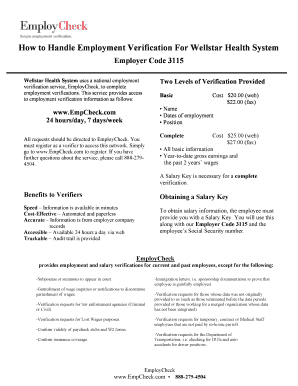
Simply go to .EmpCheck.com to register. If you have further questions about the service, please call 888-279-4504 or email EmployCheck@PreCheck.com. A Salary Key is necessary for a complete verification. To obtain salary information, the employee must provide you with a Salary Key.